BoxWatch Review - All-in-One Server Monitoring That Replaces Four Separate Tools
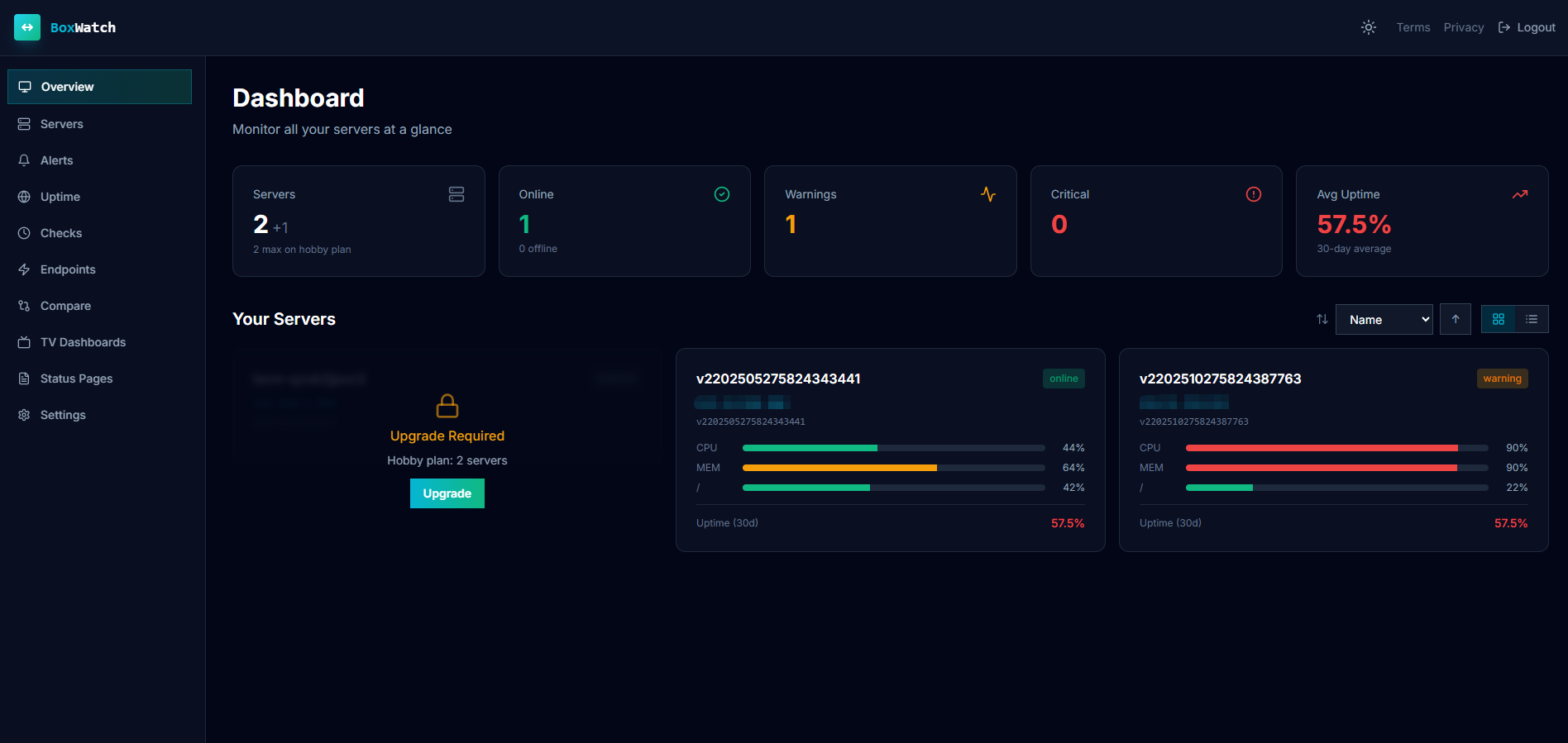
You're staring at your monitoring stack at 2am when the database connection pool hits zero. Metrics ping you from Datadog. Uptime alerts come from UptimeRobot. Cron failures appear in Healthchecks. Process restarts land in... somewhere else. Each notification in a different Slack channel, each dashboard requiring login.
By the time you've strung together Datadog, Healthchecks.io, UptimeRobot, and a separate process supervisor, you're managing four vendors, four billing cycles, four separate interfaces, and the constant frustration of context-switching between them.
BoxWatch was built because nobody should need four tools to answer a simple question: "Is my infrastructure healthy?"
In this BoxWatch review, we'll walk through how this platform actually works — and why consolidating four separate tools into one dashboard is genuinely simpler and less stressful.
Why Server Monitoring Has Become So Unnecessarily Complicated
Here's what most infrastructure teams deal with:
- You track CPU monitoring in one place, uptime monitoring somewhere else, and cron reliability in a third. Pulling together a real picture of what's actually happening? That means context-switching between dashboards.
- Monitoring solutions charge per metric, per check, or per server, so every infrastructure upgrade brings surprise invoices. You never quite know what you'll pay.
- You deploy multiple agents across your fleet. Each has its own dependencies, its own configuration quirks, its own potential failure modes.
- Each tool specializes in one problem, which means ripping out any piece of the stack requires rebuilding the whole thing.
- Alert deduplication doesn't work, so you get spammed constantly. Real problems get lost in the noise.
For network admins, developers, and security pros trying to actually solve problems instead of managing vendors? This is a waste of everyone's time.
What Is BoxWatch? One Agent, One Dashboard, One Bill
Instead of choosing between separate tools for metrics, cron heartbeats, uptime checks, and process monitoring, BoxWatch just does all four. That's not a tagline; that's actually what it does.
The setup is simple: install a small open-source bash agent on each server (one curl command), and it starts collecting what matters: CPU, memory, disk, network, uptime. All that data flows into a single dashboard where you can see your entire fleet at once. One interface. One place to set up alerts. One bill at the end of the month.
The Four Jobs BoxWatch Does at Once
1. Server Metrics: CPU, Memory, Disk, Network, and Load
BoxWatch tracks the fundamentals: real-time CPU across all cores, RAM consumption patterns that tell you when to scale, disk space that warns you days before it actually fills, network metrics that surface packet loss, load averages that reveal bottlenecks, and uptime that never lies about restarts.
The difference shows up in the monitoring dashboard visualization. Trend charts let you spot patterns over time instead of staring at a single number. Side-by-side server comparisons make it obvious when one box is an outlier. Disk-full predictions give you warnings days before a volume maxes out. This is infrastructure monitoring that actually points you toward what to fix.
2. Cron Heartbeats: Know When Your Jobs Actually Run
Most people don't realize their nightly backup stopped running until the day they need it. Cron heartbeats fix that. Set a cron job to ping a unique URL when it finishes, and BoxWatch starts watching for that ping. Job runs on time? Perfect. Job runs late? You're notified. Job doesn't run at all? You know that too.
The catch with most cron monitoring is alert fatigue: either you get notifications for every successful job (useless) or you get nothing until something breaks (dangerous). BoxWatch includes four alert types with transition-based deduplication, so you only get notified when it actually matters.
3. Uptime Checks: HTTP, TCP, and Certificate Expiry
BoxWatch doesn't just hope your endpoints are alive. It actively tests them using protocols that matter: HTTP probes for web services, TCP checks for databases and caches, and TLS-expiry monitoring so you never get blindsided by an expired certificate.
Here's the advantage: these checks run from your own deployed BoxWatch agents, not from a centralized hosted service. That means you can monitor internal databases, private APIs, and services behind firewalls. For security pros and network admins managing infrastructure that doesn't exist on the public internet, that matters a lot.
4. Process Monitoring: When a Critical Service Disappears
Long-running background services often don't crash with error codes. They just... stop. A memory leak, a hung thread, or a dependency timeout later, and your worker is dead while you're asleep.
Process monitoring watches named processes on each server. When one disappears or unexpectedly restarts, you're notified. No custom supervisor scripts, no guessing. Just clear visibility into whether your critical services are actually running.
Key Features Beyond the Four Core Jobs
Alerts That Don't Drive You Insane
- Email, Slack, Discord alerts: pick what your team already uses
- Webhook integration sends alerts to PagerDuty, Zapier, n8n, or any custom system
- Smart cooldowns prevent notification spam when things self-recover
- Recovery notifications tell you when problems are actually fixed
- Maintenance windows let you suppress alerts during planned downtime
Status Pages and SLA Tracking
Branded status pages show your customers infrastructure health without revealing internal details. Incident logging keeps a timeline of what happened and when. Track uptime SLA compliance across 24-hour, 7-day, 30-day, and 90-day windows. Weekly digest emails summarize what actually happened; monthly detailed reports give context for capacity planning.
Enterprise Features You Actually Might Use
TV dashboard mode for wall displays (useful for ops teams). 2FA for account security. Scoped API keys so third-party integrations can't access everything. Stripe self-service billing that just works.
The Open-Source Advantage
The bash agent is public on GitHub. Read every line before deploying to production. No black-box surprises. Install with one curl | bash command — 60 seconds from zero to monitoring. Webhook-native architecture means you're not locked into proprietary APIs.
Pricing: What You Actually Pay
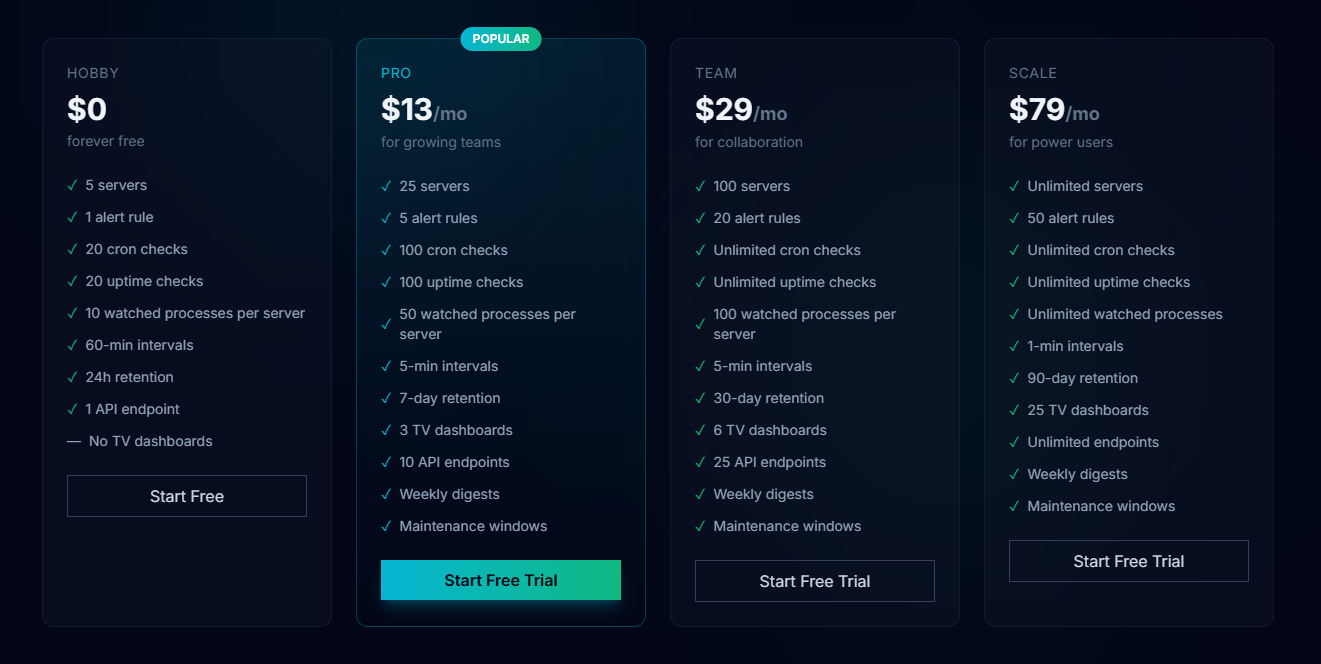
No per-metric charges. No surprise fees. Here's what you get:
- Hobby: Free forever. 5 servers, 1 alert rule, basic monitoring. Good for side projects and learning.
- Pro: $13/month for 25 servers. 5 alert rules, 5-min check intervals, 7-day retention, 3 TV dashboards, weekly digests.
- Team: $29/month for 100 servers. Unlimited cron and uptime checks, 30-day retention, 6 TV dashboards, maintenance windows.
- Scale: $79/month for unlimited servers. 50 alert rules, 1-min intervals, 90-day retention, 25 TV dashboards, unlimited API endpoints.
Every tier includes metrics monitoring, cron heartbeats, uptime checks, process monitoring, and alerts. You're not paying for "metrics monitoring" tier and then upselling to "uptime monitoring" tier. It's all there from the start.
If you've been hit by Datadog's per-metric pricing model, this flat-rate structure is genuinely refreshing.
Don't let infrastructure complexity cost you visibility. BoxWatch brings simplicity to server monitoring with straightforward pricing and a unified dashboard. The open-source agent means you're never locked in. You can read every line of code before deploying.
👉 Sign up for Free and start monitoring your servers in 60 seconds.
BoxWatch vs. The Frankenstein Stack
Most teams assemble monitoring from whatever's cheapest or most familiar:
| What | DIY Approach | BoxWatch |
|---|---|---|
| Metrics | Datadog (expensive, per-metric) | Included |
| Cron monitoring | Healthchecks.io | Built-in |
| Uptime checks | UptimeRobot | Built-in, includes internal networks |
| Process watching | Supervisord or custom scripts | Built-in |
| Dashboards | Four separate logins | One interface |
| Alerts | Different channels per platform | Email/Slack/Discord/webhooks, all in one place |
| Pricing | Unpredictable (per-metric stacking) | Flat per-server, no surprises |
| Setup overhead | Multiple agents, multiple dependencies | One lightweight bash agent |
| Internal network monitoring | Can't reach behind firewalls | Works with deployed agents |
| Time to understand what happened | Switch between platforms, lose context | One place to look |
The comparison is kind of unfair. BoxWatch consolidates what normally requires stitching together four separate vendors.
Who Should Actually Use BoxWatch
Network admins managing production infrastructure: If you're keeping dozens or hundreds of servers running, you don't want to context-switch between four platforms to answer basic questions. One dashboard for CPU, memory, disk, and network metrics means faster incident response.
Development teams shipping production apps: Developers need to know when services fail, when cron jobs don't run, when disk fills up. BoxWatch covers all three without forcing your team to juggle multiple logins and alert channels.
Security professionals on private networks: Unlike hosted uptime services that can't reach behind firewalls, BoxWatch's agent-based architecture lets you monitor internal databases, cache layers, replication streams. The infrastructure that actually matters to security.
Teams that have been burned by surprise bills: Per-metric billing scales in ways you don't expect. BoxWatch's flat-rate pricing means you know exactly what you'll pay, and adding more servers doesn't trigger sticker shock.
Organizations that care about code visibility: The open-source agent means you're not deploying unknown software to your infrastructure. You can read the code, understand what it collects, audit it, fork it if needed.
What BoxWatch Is Not
Just as important as knowing what BoxWatch does, it's worth being clear about what it isn't:
- Not an application performance monitoring (APM) tool: BoxWatch monitors infrastructure: CPU, memory, disk, network, uptime, processes. It doesn't trace individual requests through your application code like New Relic or DataDog APM would.
- Not a log aggregation platform: If you need centralized log management, you'll still need a separate solution like ELK or Datadog Logs.
- Not a full observability platform: BoxWatch covers infrastructure monitoring exceptionally well, but doesn't include distributed tracing or complex analytics.
- Not for teams needing massive custom metrics: Per-server pricing means it's not the flexible choice if you need thousands of custom metrics per server.
This honesty about scope is refreshing. BoxWatch does four things better than four separate tools; it doesn't pretend to do everything.
The Real Value: Simplicity Without Compromising Power
The most valuable thing BoxWatch offers might not be a specific feature. It's the elimination of complexity.
Instead of maintaining integrations between four platforms, managing four separate alert configurations, and explaining to your team how to navigate four different dashboards, you have one source of truth for infrastructure health.
This is what unified server monitoring actually looks like: comprehensive coverage without the cognitive load.
For teams managing production infrastructure, that simplicity translates directly to faster incident response. When a disk is filling up, a process crashes, or a cron job misses its window, you're notified through channels your team already uses (Slack, Discord, email, PagerDuty). You see the alert, understand the context immediately because it's all in one dashboard, and respond accordingly.
No context switching. No hunting through multiple interfaces. Just clear, actionable information.
The Bottom Line
BoxWatch is built for people who are sick of managing vendors instead of infrastructure. It does exactly what it promises: consolidates four separate tools into one platform with one dashboard and one bill.
If you've been managing Datadog + Healthchecks + UptimeRobot + Supervisord and you're tired of it, this platform actually solves that problem. Not theoretically. Actually.
Don't let infrastructure complexity slow you down. BoxWatch brings simplicity to server monitoring with one agent that does the job of four tools, transparent pricing, and an open-source codebase you can audit. Start monitoring in 60 seconds.
👉 Sign up for Free — no credit card required.
Tags
# Review# BoxWatch# server monitoring# server monitoring tool# server metrics# monitoring dashboard# uptime monitoring# metrics monitoring# CPU monitoring# network monitoring# disk monitoring# process monitoring# cron monitoring# cron heartbeats# uptime checks# HTTP monitoring# TCP monitoring# TLS monitoring# server health monitoring# infrastructure monitoring# application monitoring# system monitoring# performance monitoring# real-time monitoring# alert management# network admin tools# server management# DevOps monitoring# monitoring solution# unified monitoring# open source monitoring# bash agent# Datadog alternative# monitoring tool comparison# server uptime# system health check# disk space monitoring# memory monitoring# load monitoring# status page# incident management# monitoring alerts# Slack alerts# Discord alerts# webhook monitoring# PagerDuty integration# affordable monitoring# monitoring for startups# server monitoring free# monitoring dashboard design# multi-region monitoring# maintenance windows# SLA tracking# uptime reporting# monitoring metricsFree To Use Review - The Safest Royalty-Free Music Platform for Content Creators
ShipThing Review - The Ultimate Next.js SaaS Boilerplate
Follow for new blogs
Subscribe to our blog
Subscribe to Newsletter
Subscribe to our newsletter to get the best products weekly.