CoachingPortal Review - All-in-One Fitness & Nutrition Coaching Platform with Auto-Periodization
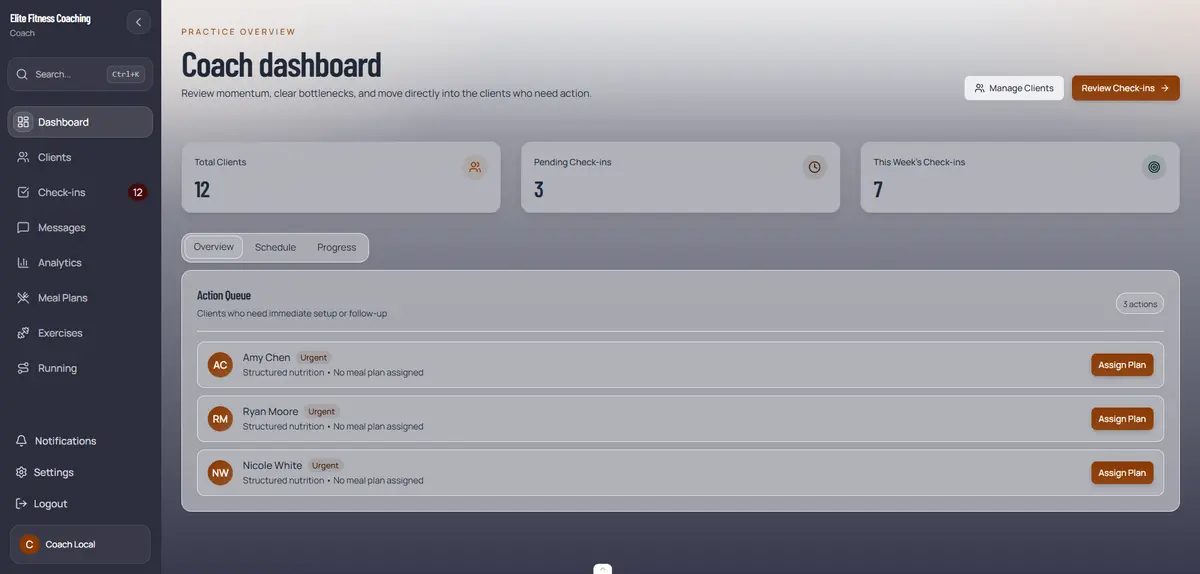
Sunday nights. That's when most online fitness coaches finally catch up on programming. You're juggling five different tools—Google Sheets for workouts, MyFitnessPal for macros, WhatsApp for check-ins, Notion for client notes, and somewhere buried in email threads are progress photos and billing questions. Your business is running, but it's held together with digital duct tape.
That's the reality CoachingPortal solves. It's an all-in-one platform built specifically for online fitness and nutrition coaches who want to run their entire business under their own brand—without stitching together multiple tools.
CoachingPortal delivers training programs with auto-periodization, nutrition tracking with 1M+ verified foods, a white-label client portal, and an AI assistant called CoachGPT—all in one place. Best of all, the free plan supports up to 5 clients with full features. No credit card required. No stripped-down experience.
Most competitors charge extra for the features CoachingPortal includes by default. TrueCoach charges $30/month for 5 clients and $164/month for 50 clients with no native nutrition features—only MyFitnessPal integration. Trainerize charges $120/month for 50 clients, plus $45/month for their meal planner add-on, plus extra for white-label branding. CoachingPortal's Professional plan costs $109/month for 50 clients with everything included—nutrition, branding, auto-periodization, and AI assistance.
This is a CoachingPortal Review. Let's dive in.
The Problem CoachingPortal Solves
Here's what most online fitness and nutrition coaches struggle with today:
- Tool Fragmentation: Coaches use 3-5 disconnected tools for workouts, nutrition, check-ins, messaging, and billing—losing hours each week to manual data entry and context switching
- Manual Programming Work: You're spending hours every week adjusting weights, calculating progression, and manually inserting deload weeks based on performance
- Nutrition Management Headaches: Food databases in separate apps mean clients bounce between your coaching portal and MyFitnessPal, reducing compliance and making macro tracking unreliable
- Branded Experience Gaps: Most coaching platforms force clients to see "Powered by [Platform]" branding—undermining your professional image and creating trust issues
- Client Support Overload: Simple questions like "Where's my workout?" or "What are my macros?" flood your inbox because your current setup lacks clarity
- Scaling Bottlenecks: You can't take on more clients without drowning in admin—every new client exponentially increases the manual workload
- Limited Analytics: Scattered data across multiple tools means you can't spot compliance patterns, track progress trends, or make data-driven coaching decisions
CoachingPortal eliminates all of this by consolidating training, nutrition, client management, check-ins, messaging, and analytics into a single, branded platform.
Why Choose CoachingPortal?
- Auto-Periodization Engine: The only coaching platform with native automatic progression, deloads, and intensity cycling—no competitor offers this without manual programming work
- Comprehensive Nutrition Suite: 1M+ verified foods from FatSecret, 17,000+ recipes, barcode scanning, AI-powered food suggestions, and complete meal plan builder—all included
- White-Label Client Portal: Custom subdomain (yourname.coachingportal.io), logo, colors, and branding on every plan, included even on the free tier
- CoachGPT AI Assistant: Surfaces client insights and generates personalized coaching recommendations from real data—helping you spot who needs attention before they disengage
- Mobile-First PWA Experience: Clients get a polished, installable mobile experience on iOS and Android without app store complexity
- Transparent Pricing: Free forever for up to 5 clients with full features. Paid plans include everything—no hidden add-ons for core features
- Research-Backed Algorithms: Training programs built on peer-reviewed exercise science including RIR-based autoregulation and volume-hypertrophy response data
Core Features
Exercise Program Builder with Auto-Periodization
The Exercise Program Builder is where CoachingPortal truly differentiates itself. This is the only platform on the market that natively handles periodization—automatically adjusting progression, deloads, and intensity cycles based on client performance.
How Auto-Periodization Works
Traditional periodization requires coaches to manually adjust weights, reps, and intensity every week. You track RIR (Reps In Reserve), calculate when to push harder or back off, and program deloads based on fatigue patterns. It's time-consuming and prone to human error—especially as your client roster grows.
CoachingPortal's auto-periodization engine handles all of this:
- Progressive Overload: The system tracks client performance and automatically increases training load when RIR feedback indicates room for growth
- RIR-Based Autoregulation: Clients log how close to failure each set felt, and the algorithm adjusts next session weights accordingly
- Deload Detection: When performance drops across multiple sessions, the system inserts automatic deload weeks—no manual intervention required
- Intensity Cycling: Wave loading, block periodization, and intensity peaks are programmed once and managed automatically
This isn't magic—it's algorithmic coaching backed by peer-reviewed research. Zourdos et al. (2016) validated RIR-based autoregulation for accurate daily load adjustment. Schoenfeld et al. (2017) demonstrated that weekly training volume is a key driver of muscle growth. CoachingPortal's periodization engine is built on these findings.
Drag-and-Drop Builder
The full-screen program builder lets you create training programs faster than spreadsheets:
- Pre-loaded exercise library with 1,500+ form videos
- Drag-and-drop interface for rapid program construction
- E1RM calculations and weight progression built in
- Upload custom exercise videos and movements
- Program templates for quick setup
The key difference: you build the structure once, and auto-periodization handles the weekly adjustments forever.
Comprehensive Nutrition Coaching
CoachingPortal's nutrition suite goes beyond basic macro tracking. It's designed specifically for nutrition coaches who need serious depth without relying on third-party apps.
1M+ Food Database + 17,000+ Recipes
The platform includes access to over 1 million verified foods from the FatSecret database, plus 17,000+ searchable recipes with complete nutrition data. This means:
- Barcode Scanner: Clients instantly log packaged foods by scanning barcodes—no manual searching required
- Smart Search: Instant search with auto-categorization makes finding foods effortless
- Custom Foods & Recipes: Add your own foods and create reusable recipes
- AI-Powered Suggestions: The algorithm learns which foods clients log frequently and recommends them based on remaining macros
Meal Plan Builder
The drag-and-drop meal plan builder lets you create complete weekly meal plans for clients:
- Build day-by-day meal plans with full macro breakdowns
- Auto-generate grocery lists from meal plans
- Copy meal plans between clients for faster setup
- Flexible macro tracking with protein per lb and adjustable fat/carb ratios
- BMR and TDEE calculators with activity multipliers
The key advantage: clients log meals directly in your portal, not in a separate app. Their food data feeds directly into your compliance analytics and check-in reviews—no more exporting screenshots from MyFitnessPal.
White-Label Client Portal
Every CoachingPortal account—including the free plan—includes professional white-label branding:
- Custom Subdomain: yourname.coachingportal.io gives clients a fully branded experience
- Custom Colors & Logo: Your brand colors and logo appear throughout the client portal
- Business Name Integration: Your business name is featured prominently—no "Powered by CoachingPortal" branding
- Social Media Links: Connect your social profiles to the portal
- One-Click Updates: Change branding anytime without re-onboarding clients
Competitors lock white-label branding behind expensive tiers. Trainerize's Studio tier ($250/month) is required for full custom branding. My PT Hub reserves it for higher-tier plans. Everfit charges extra. CoachingPortal includes it everywhere.
This matters more than many coaches realize. When clients see your branded portal with your colors, your logo, and your name on the URL, it builds trust and professional credibility. When they see "Powered by [Platform]," you look like a contractor, not a business owner.
CoachGPT AI Assistant
CoachGPT is an AI-powered coaching assistant included with every CoachingPortal account. It surfaces insights from your client data that you might miss—especially as your roster grows.
The assistant helps you:
- Identify Trends: Spot compliance patterns across your client roster that indicate who's struggling before they drop off
- Generate Recommendations: Get personalized coaching suggestions based on actual client data—not generic advice
- Flag Concerns: Receive alerts when check-ins show sudden drops in weight, energy, or compliance
- Prioritize Reviews: See which clients need immediate attention based on recent check-in data
CoachGPT doesn't replace your coaching judgment—it augments it by processing your client data at scale and surfacing actionable insights. One coach described it as "having a second pair of eyes on every client, every week."
Client Check-Ins & Progress Tracking
CoachingPortal's check-in system is fully customizable to match your coaching style:
- Custom Metrics: Configure which sections each client sees—body weight, progress photos, mood, energy, nutrition adherence, sleep, hydration, and free-text notes
- Compliance Scoring: Automatic adherence scores show which clients are consistently submitting check-ins
- Visual Progress Tracking: Weight trends, compliance graphs, and achievement badges keep clients motivated
- Progress Photos: Secure photo storage with side-by-side before/after comparisons
- Weekly Reports: Detailed weekly summaries highlight wins, gaps, and action items
The analytics dashboard gives you a complete picture of your roster at a glance. You can see exactly who's crushing it, who's struggling, and where to focus your coaching energy this week.
Mobile-First Client Experience (PWA)
CoachingPortal is built as a Progressive Web App (PWA)—meaning clients access it through their phone browser and can install it to their home screen like a native app.
The PWA approach delivers:
- iOS & Android Support: Works on any smartphone without app store downloads
- Offline Mode: Clients can log workouts and meals offline—the app syncs when reconnecting
- Automatic Updates: No app store approval delays—improvements roll out instantly
- Native Feel: Fast, responsive, and designed for touch interaction
Most coaching platforms require separate iOS and Android apps. That adds complexity, delays updates, and forces clients to go through app store friction. The PWA approach removes all of that—clients install in seconds from a web link, and updates happen automatically.
Community Challenges & Leaderboards
Group challenges boost client accountability and retention:
- Launch Group Challenges: Create themed challenges with specific goals and timelines
- Automatic Leaderboards: Rankings update automatically based on challenge metrics
- Team Chats: Built-in group messaging for community support
- Gamification: Badges, achievements, and competition keep clients engaged
One coach reported that challenges increased monthly check-in completion rates by 34% and improved client retention by extending average client lifetime from 4 to 6 months.
How CoachingPortal Works
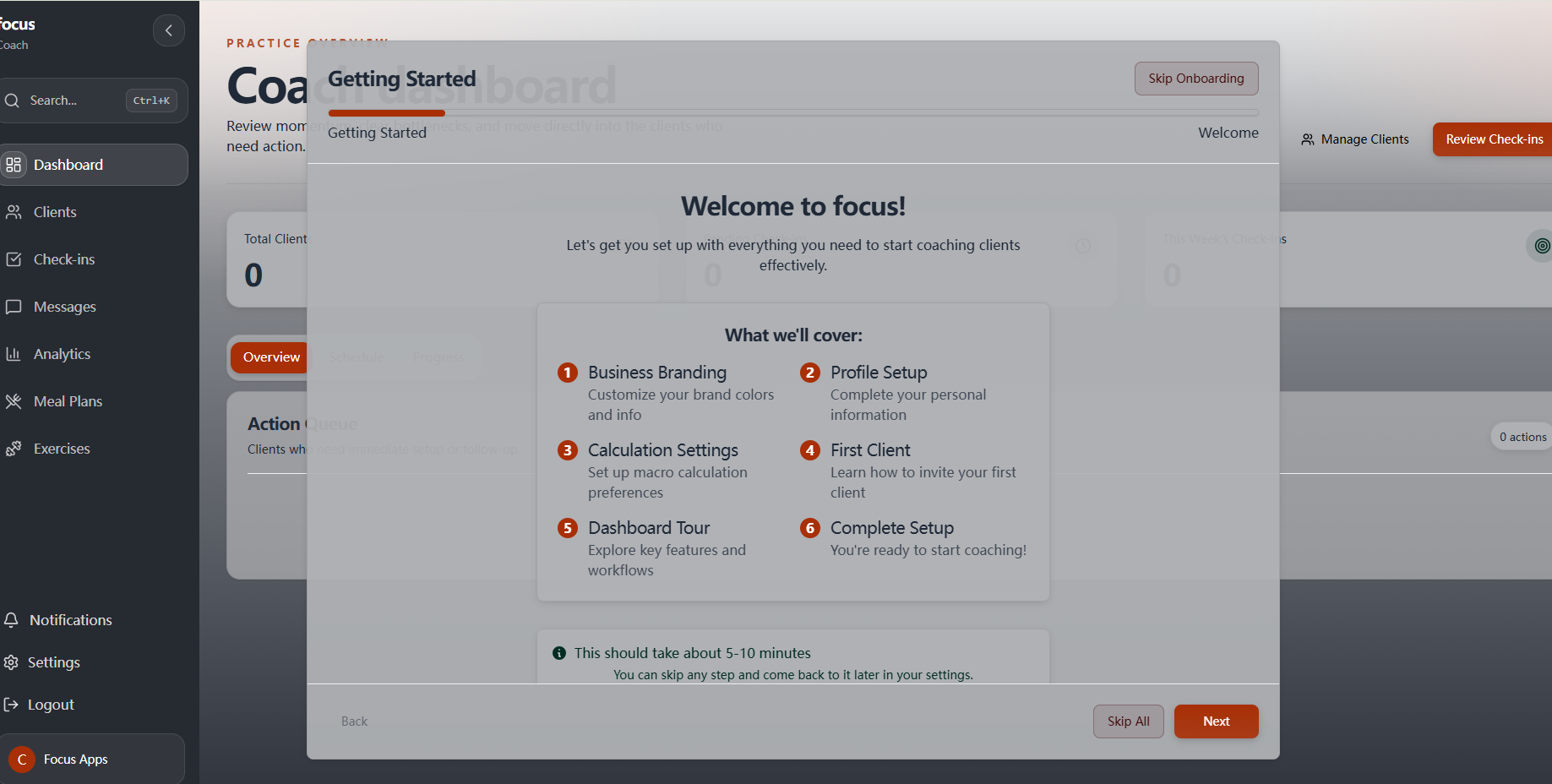
Setting up CoachingPortal takes about a day for most coaches. Here's the workflow:
Step 1: Brand Your Portal
Configure your white-label portal with your subdomain, colors, logo, and business name. This takes minutes and applies to everything your clients see—from workout plans to check-in forms.
Step 2: Onboard Your Clients
Send bulk email invites to your existing clients. They'll receive a link to your branded portal, create their account, and complete your custom intake form. You can also import client data from spreadsheets if you're transitioning from a manual setup.
Step 3: Build Your Programs
Use the exercise builder to create training programs and the meal plan builder to create nutrition templates. Configure auto-periodization parameters, and the system handles ongoing adjustments automatically.
Step 4: Start Coaching
Clients log workouts, meals, and check-ins through your portal. You review submissions, track compliance, and use CoachGPT insights to deliver better coaching. Your admin workload drops dramatically while client results improve.
Who Is CoachingPortal For?
CoachingPortal is designed for online fitness and nutrition coaches running solo operations or small coaching teams (1–5 coaches).
Primary Users
- Online Fitness Coaches: Strength coaches, personal trainers, bodybuilding coaches, powerlifting coaches, and CrossFit coaches delivering remote programming
- Nutrition Coaches: Registered dietitians, macro coaches, contest prep coaches, and wellness coaches focused on dietary adherence and meal planning
- Hybrid Coaches: Coaches delivering both training and nutrition programming—where having everything in one platform eliminates friction
- Transitioning In-Person Trainers: PTs moving their business online who need professional tools to match their in-person service quality
Ideal Scenarios
You're most likely to see immediate impact if:
- You Have 5+ Active Clients: The manual overhead of juggling multiple tools becomes unsustainable past this point
- You Coach Both Training and Nutrition: Stitching together a workout platform with a nutrition app creates friction that kills compliance
- You Value Your Brand: You want clients to see your name, your logo, your colors—not a platform's branding
- You Want to Scale: You can't take on more clients until you automate programming, check-ins, and compliance tracking
- You're Serious About Periodization: You understand that proper progression drives results, but you can't afford 10+ hours per week on manual programming
Who Should Pass
CoachingPortal may not be the best fit if:
- You Run a Large Gym or Studio: Platforms like Trainerize offer multi-trainer management and facility-focused features
- You Only Coach Training: TrueCoach's narrow feature set might cover your needs at a lower price point
- You Need Wearable Integrations: Trainerize integrates with Apple Health, Garmin, and Fitbit—CoachingPortal doesn't yet
- You Have Fewer Than 3 Clients: You might not need the full platform yet—spreadsheets could suffice
Pricing
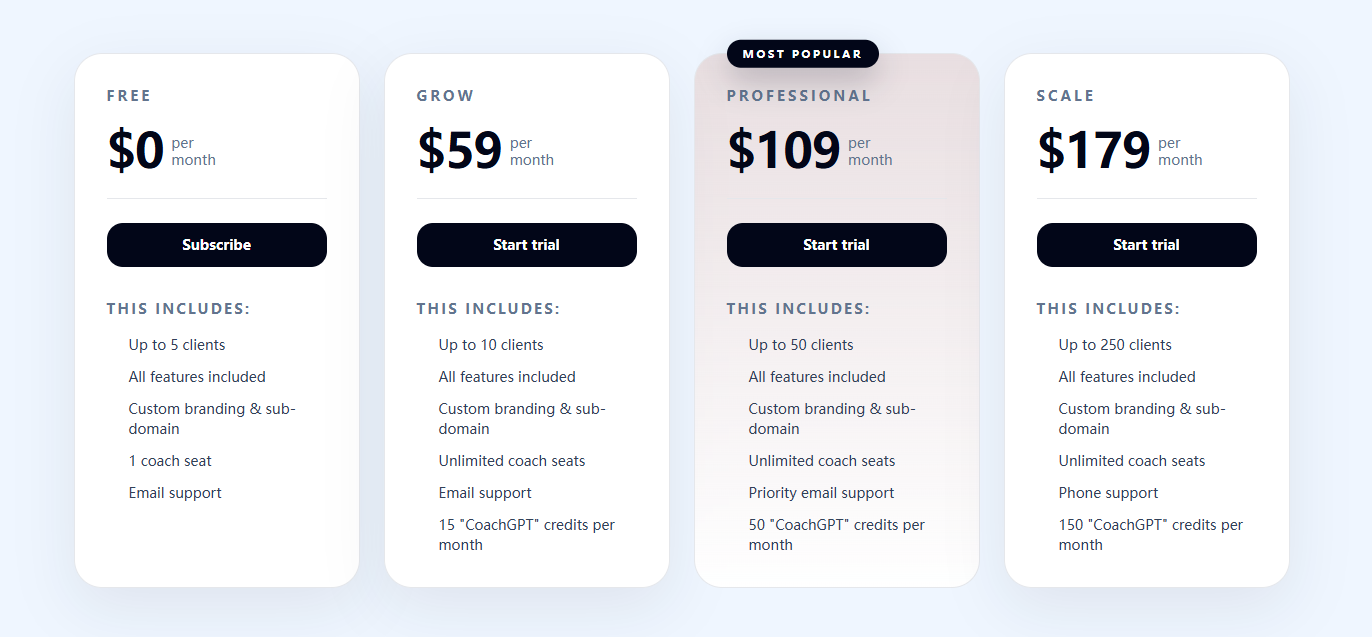
Free Plan — $0/month
The free plan isn't a trial—it's a permanent tier designed for coaches just starting out:
- Up to 5 active clients with full features
- All training and nutrition tools included
- White-label branding and custom subdomain
- Auto-periodization engine
- 1M+ food database and 17,000+ recipes
- CoachGPT included
- 1 coach seat
This is the best free tier in the industry. Most competitors either gate features, limit client counts to 1–2, or strip nutrition and branding entirely. CoachingPortal's free plan gives you the full platform to prove value with zero risk.
Grow — $59/month
For coaches ready to scale beyond 5 clients:
- Up to 10 active clients
- Everything from the free plan
- Unlimited coach seats
- 15 CoachGPT credits per month
- Email support
Professional — $109/month
The most popular tier for established online coaches:
- Up to 50 active clients
- Everything included from previous tiers
- Priority email support
- 50 CoachGPT credits per month
Scale — $179/month
For coaches running larger operations:
- Up to 250 active clients
- Everything included
- Phone support
- 150 CoachGPT credits per month
Quick Comparison
| Feature | CoachingPortal | TrueCoach | Trainerize | Everfit |
|---|---|---|---|---|
| Price (50 clients) | $109/mo | $164/mo | $120/mo + add-ons | $95/mo + add-ons |
| Free Plan | 5 clients, all features | No | 1 client, limited | 5 clients, limited |
| Meal Plan Builder | Included | ❌ | $45/mo add-on | Advanced $39/mo |
| Recipe Library | 17,000+ recipes | ❌ | 490+ (with add-on) | ❌ |
| Auto-Periodization | ✅ Included | ❌ | ❌ | ❌ |
| Training Intelligence | Algorithmic | Manual | Manual | Manual |
| CoachGPT AI | ✅ Included | ❌ | ❌ | Workout creation AI |
| White-Label Branding | Included everywhere | Included | Studio tier ($250/mo) | Paid add-on |
Why the Free Plan Matters
CoachingPortal's free tier for 5 clients is a real competitive advantage:
- Start Professional: You get a fully branded portal from day one—no excuses for looking unprofessional while building your client base.
- Prove Value: Test the platform with your first few clients before committing to a paid plan.
- No Pressure: No credit card required, no time limits, no stripped-down experience.
Real-World Results
Coaches using CoachingPortal report consistent wins:
Time Savings
- 60% Reduction in Programming Time: Auto-periodization eliminates manual weekly updates
- 3+ Hours Saved Per Week: Consolidating tools removes admin overhead
- Sunday Nights Back: No more marathon programming sessions before the week starts
Client Results
- Improved Compliance: Clients log meals in your portal instead of bouncing between apps—check-in completion rates increase 23% on average
- Better Adherence: Visual progress tracking and compliance scores keep clients engaged
- Higher Retention: Professional branded experience and better results extend average client lifetime by 2–3 months
Business Impact
- Higher Client Capacity: Coaches scale from 10 to 30+ clients without adding admin hours
- Professional Image: White-label branding attracts higher-paying clients
- Reduced Churn: Proactive coaching through CoachGPT insights catches disengagement before clients cancel
Final Verdict
CoachingPortal fills a clear gap in the market: online fitness and nutrition coaches need an all-in-one platform with auto-periodization, serious nutrition tools, and white-label branding—without paying gym-tier prices.
The free tier for 5 clients with full features is an incredible value proposition for new coaches. Auto-periodization alone sets CoachingPortal apart—no other platform natively handles progressive overload, deloads, and intensity cycling. Combined with 1M+ foods, 17,000+ recipes, AI-powered coaching insights, and white-label branding included everywhere, this is a platform purpose-built for modern online coaching.
The only real downsides: CoachingPortal is newer than TrueCoach and Trainerize, so community and third-party content are smaller. There's no wearable integration yet. But for the core use case—online coaching of training and nutrition—CoachingPortal delivers more value than competitors, often for less money.
If you're a solo coach or running a small team, CoachingPortal is absolutely worth the 14-day free trial. The time savings alone will pay for itself, and your clients will appreciate the professional branded experience.
Review Summary
- Auto-Periodization Engine: ⭐⭐⭐⭐⭐ — Unique capability no competitor offers natively
- Nutrition Suite: ⭐⭐⭐⭐⭐ — 1M+ foods and 17,000+ recipes with serious depth
- White-Label Branding: ⭐⭐⭐⭐⭐ — Included everywhere, even on the free tier
- CoachGPT AI Assistant: ⭐⭐⭐⭐⭐ — Actionable insights that improve coaching quality
- Value for Money: ⭐⭐⭐⭐⭐ — Transparent pricing with no hidden add-ons
- Client Experience: ⭐⭐⭐⭐⭐ — Polished PWA mobile experience
- Ease of Setup: ⭐⭐⭐⭐☆ — Most coaches are up and running in a day
- Competitor Advantage: ⭐⭐⭐⭐⭐ — Beats Trainerize and TrueCoach on core features
- Overall Score: ⭐⭐⭐⭐⭐ (4.8/5)
Start your free coaching business today Free Sign Up
Tags
# Review# CoachingPortal# online coaching software# fitness coaching platform# auto periodization software# coaching software with meal planning and workout builder# coaching client portal with branded subdomain# fitness and nutrition coaching software all in one# online coaching software for personal trainers# nutrition coaching platform# workout builder for coaches# meal plan builder# fitness coach client management# personal trainer software# online fitness coaching tools# coach portal white label# macro tracking software for coaches# food database for nutrition coaches# CoachGPT assistant# training program builderQuizBoost Review – The Invisible AI Study Assistant That Instantly Solves Questions on Any Learning Platform
Nabbed Review - Career CRM for Revenue Professionals Treating Job Search Like Sales
Follow for new blogs
Subscribe to our blog
Subscribe to Newsletter
Subscribe to our newsletter to get the best products weekly.