Lynara Review - Precise Multi-Layer System Architecture Design Tool
Welcome to this comprehensive Lynara Review! 😊
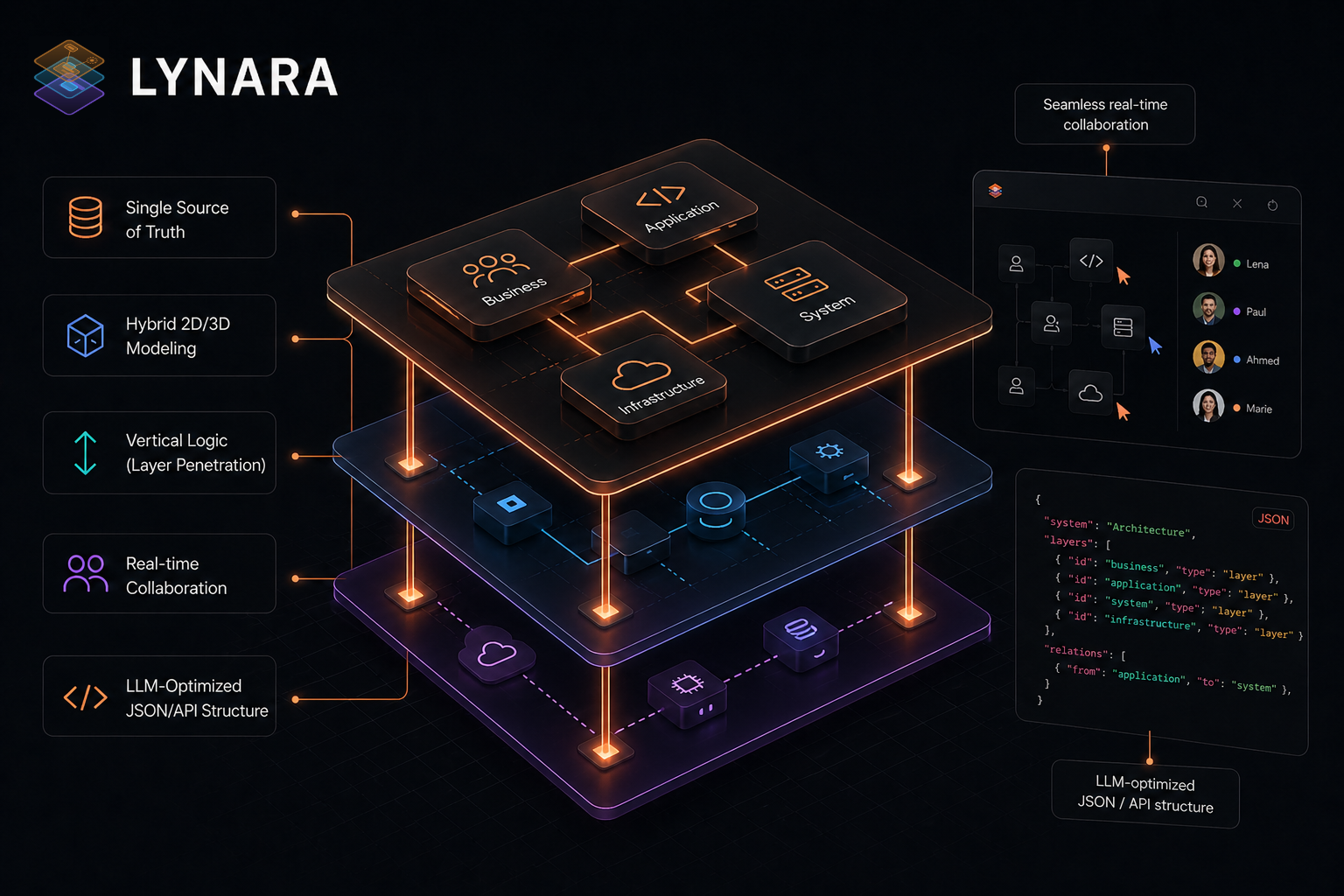
If you've ever worked on a complex software project, you know the challenge: how do you keep track of everything from the frontend user interface down to the deepest infrastructure layer? Traditional diagram tools force you into flat, two-dimensional representations that fail to capture the true complexity of modern software systems. Layers get tangled, relationships become unclear, and every time something changes, you spend hours manually updating diagrams that are already outdated.
That's exactly the problem Lynara was designed to solve. In this detailed review, we'll explore how this modern software architecture visualization tool brings a fresh approach to system design through its innovative multi-layer architecture design paradigm. Whether you're working with microservices, modular monoliths, or distributed hybrid server concepts, Lynara provides the tools to create clear, organized, and future-proof architecture documentation.
What makes this review particularly interesting is that Lynara comes from Switzerland—a country known for precision engineering and quality software. Let's see if this architecture diagram tool lives up to that reputation.
The Challenge of Modern Software Architecture Design
Before diving into this Lynara review, let's understand why effective architecture design matters more than ever:
- Increasing System Complexity: Modern applications span multiple services, databases, and infrastructure layers that are interconnected in sophisticated ways
- Team Collaboration Needs: Distributed teams need clear shared understanding of the system architecture at every level
- Documentation Burden: Architecture documentation quickly becomes outdated, leading to knowledge gaps and onboarding challenges
- Communication Gaps: Technical and non-technical stakeholders struggle to align on system design without clear visualization
- Scalability Concerns: Poor initial architecture decisions create technical debt that becomes expensive to fix later
This architecture review examines how Lynara addresses these challenges through its unique multi-layer approach to system architecture design.
Why Lynara Stands Out: A Detailed Review
🎯 Built for Architects by Architects
Lynara was created because no existing tool could intuitively map the complexity of modern multi-layer architecture. As emphasized on their concept page: while others only allow drawings, Lynara provides a framework that understands the vertical logic of your system—from cloud infrastructure all the way to the user interface.
🎯 Multi-Layer Architecture Design Philosophy
At the heart of Lynara is an innovative multi-layer design approach that fundamentally changes how teams conceptualize and communicate software architecture:
- Layer Separation: Seamlessly divide complex IT systems into logical layers from UI through services to data
- Vertical Logic: Navigate through layers with layer penetration, seeing how each layer connects to the others
- Full Visibility: Maintain complete visibility across all technical layers of your project
- Scalable Design: Create future-proof, highly scalable architecture structures
- Clear Boundaries: Define clear interfaces between layers for better maintainability
This multi-layer architecture design approach is what truly sets Lynara apart from generic diagram tools. Rather than forcing everything into a flat, confusing mess, it embraces the natural hierarchy of modern software systems.
🎯 Single Source of Truth
Unlike traditional architecture documentation that becomes outdated, Lynara serves as your Single Source of Truth:
- Structured Data: Not just static images—your architecture is stored as structured, queryable data
- Machine-Readable: LLM-Optimized JSON/API structure makes your architecture readable by AI tools
- Real-time Sync: Always current, automatically synchronized across your team
- Version Control Friendly: Store architecture alongside your code
🖼️ Interactive Architecture Map Canvas
The interactive architecture map canvas is where Lynara really shines in this review. Unlike static diagram tools, this canvas allows you to:
- Visual Planning: Design your architecture visually with intuitive drag-and-drop interactions
- Real-time Updates: See changes reflected instantly across all connected views
- 3D Visualization: Visualize complex software landscapes in 3D for better spatial understanding
- Zoom & Navigate: Move between high-level overviews and detailed component views seamlessly
The canvas serves as the central hub for all your architecture design activities, making it easy to explore and modify system designs without losing the big picture.
☁️ Cloud-Native Architecture Support
For teams building modern cloud-native applications, Lynara provides specialized features:
- Microservices Design: Model complex microservice architectures with clear service boundaries
- Container Awareness: Visualize container relationships and orchestration patterns
- Distributed Systems: Map connections between distributed components effectively
- Hybrid Infrastructure: Design hybrid server concepts that span cloud and on-premises
This architecture platform is particularly valuable for teams working with Kubernetes, Docker, and other cloud-native technologies.
🔧 System Architecture Design Tool Features
As part of this review, I tested the core functionality that makes Lynara an effective system architecture design tool:
Import/Export Capabilities
One standout feature highlighted in this Lynara review is the comprehensive export functionality:
- LLM-Optimized Export: Export your entire system landscape as machine-readable mapping, optimized for AI/LLM consumption
- JSON Export: Machine-readable architecture data for integration with other tools
- LLM-Markdown Export: Human-friendly markdown format for documentation
- Mermaid Export: Generate Mermaid diagrams for use in markdown documentation
- PNG Export: High-quality image export for presentations and sharing
- Tool Migration: Import designs from other architecture tools
- Version Control Friendly: Store architecture as code-like artifacts
Productivity-Focused Design
Lynara includes intuitive keyboard shortcuts for efficient workflow:
- Quick Node Creation: Double-press to create nodes instantly
- Efficient Editing: Standard shortcuts for copy/paste, undo/redo
- Smart Navigation: Scroll between layers, arrow keys for precise positioning
- Multi-Select: Shift-click to select and manipulate multiple elements
These shortcuts transform Lynara from a simple diagram tool into a professional-grade architecture design environment.
🔗 Integrations & Ecosystem
Lynara's power extends beyond the platform itself through comprehensive integrations that keep your architecture documentation synchronized with your existing tools:
Knowledge Base & Documentation Sync
- Seamlessly embed interactive architecture maps into Confluence, Notion, and Google Workspace
- Keep documentation automatically in sync with your live architecture designs
- Eliminate the problem of outdated technical documentation
Development & DevOps Integration
- Connect directly to GitHub, GitLab, and Bitbucket repositories
- Automatically sync services, repositories, and CI/CD pipelines
- Visualize your entire development infrastructure dynamically
- Track pull requests, commits, and codebase architecture in real-time
Enterprise Authentication
- Support for Google Workspace, GitHub, and Microsoft SSO
- Streamlined single sign-on for seamless team access
- Enterprise-grade security with familiar authentication methods
This ecosystem approach means Lynara becomes the central hub for architecture documentation while integrating with the tools your team already uses daily.
🌐 Browser-Based Architecture Platform
One of the most practical aspects of this software architecture platform is its accessibility:
- No Installation Required: Works instantly in your browser
- Cross-Platform Compatibility: Access from any device with a modern browser
- Real-time Collaboration: Work with team members simultaneously
- Always Up-to-Date: Never worry about version compatibility or updates
This SaaS approach means you can start designing immediately without IT setup or local installations.
Who Should Use Lynara? Our Review Analysis
Based on my thorough review, Lynara is ideal for:
Software Architects & System Designers
If you spend your days designing complex systems, Lynara provides the clarity you need:
- Create precise multi-layer system designs
- Document architecture decisions clearly
- Communicate designs effectively to stakeholders
- Maintain living architecture documentation
Development Teams
Development teams benefit from shared understanding:
- Align on system structure before coding begins
- Onboard new team members quickly with clear visuals
- Track architecture evolution over time
- Reduce misunderstandings during implementation
Technical Leads & Engineering Managers
Leadership roles require balancing technical and strategic concerns:
- Make architecture decisions visible to leadership
- Plan scalability and future expansion
- Coordinate between multiple sub-teams
- Demonstrate architectural thinking to stakeholders
Enterprise Architecture Teams
Large organizations have unique needs that Lynara addresses:
- Enterprise-wide architecture standardization
- Compliance documentation requirements
- Legacy system integration planning
- Multi-team collaboration at scale
Pricing Plans: Detailed Review
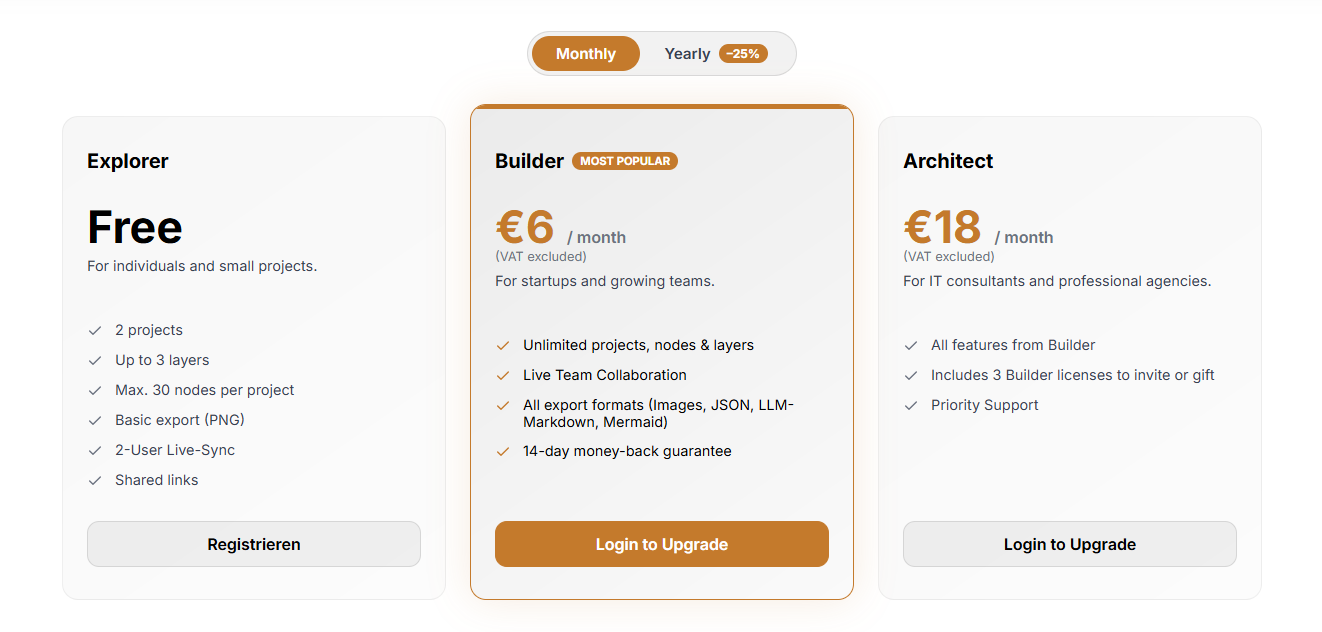
This Lynara review found that the platform offers simple, transparent pricing with options for everyone from individual developers to enterprise teams:
Explorer (Free) - Perfect for Getting Started
The free plan is genuinely useful for learning and small projects:
- 2 projects: Manage multiple architecture designs
- Up to 3 layers: Essential multi-layer support
- Max. 30 nodes per project: Suitable for focused system components
- Basic export (PNG): Export static images
- 2-User Live-Sync: Collaborate with one team member
- Shared links: Share your work easily
This free architecture design tier is perfect for evaluating Lynara and creating your first projects without any financial commitment.
Builder (€6/month) - Most Popular Choice
At just €6 per month (with 25% annual discount available), the Builder plan unlocks professional-grade features:
- Unlimited projects, nodes & layers: No restrictions on complexity
- Live Team Collaboration: Work simultaneously with your entire team
- All export formats: Images, JSON, LLM-Markdown, Mermaid diagrams
- 14-day money-back guarantee: Risk-free trial
This plan is ideal for startups and growing development teams who need full access to Lynara's capabilities.
Architect (€18/month) - For Professional Consultants
The Architect plan builds on Builder with additional licensing:
- Everything in Builder: Full feature access
- Includes 3 Builder licenses: Invite team members or gift to clients
- Priority Support: Faster response times for issues
This tier is designed for IT consultants and professional agencies managing multiple client projects.
Universities & Schools (Free)
Lynara also offers a free plan for students and educators:
- Free for academic use: Requires verification via university/school email
- All Builder features: Unlimited projects, nodes, layers, and full export formats
- Covering 2000+ institutions: Available to students and educators worldwide
This initiative supports the next generation of software architects in learning modern architecture design.
Multi-Layer Architecture Explained
For those new to multi-layer architecture design, Lynara's approach typically includes:
User Interface Layer
The topmost layer where users interact with your application:
- Web interfaces
- Mobile apps
- API gateways
- Client-side components
Services Layer
The business logic and processing layer:
- Microservices
- Serverless functions
- Business logic components
- Integration services
Data Layer
Where information is stored and managed:
- Databases (SQL/NoSQL)
- Data warehouses
- Caching systems
- File storage
Infrastructure Layer
The foundational layer supporting everything above:
- Cloud services
- Container orchestration
- Networking
- Security infrastructure
This separation allows teams to work on individual layers without affecting others, making system evolution much more manageable.
How Lynara Compares: Review Perspective
Why Lynara is the New Standard
According to Lynara's concept page, here's how they compare to the typical architecture documentation approach:
| Aspect | Status Quo | Lynara Platform |
|---|---|---|
| Tools & Documentation | Chaos of tools & outdated wikis | Single Source of Truth |
| Data Format | Images (PNGs) instead of structured data | Hybrid 2D/3D system modeling |
| Thinking Approach | Horizontal thinking (just diagrams) | Vertical Logic (Layer Penetration) |
| Updates | Tedious, manual updates | Seamless real-time collaboration |
| AI Compatibility | No AI-readability of the architecture | LLM-Optimized JSON/API Structure |
This architecture review confirms that Lynara represents a fundamental shift from static diagrams to dynamic, machine-readable architecture documentation.
What Makes Lynara Unique
This architecture platform review identified several unique aspects:
- Authentic Multi-Layer Framework: Built from the ground up for multi-layer thinking, not retrofitted to flat diagrams
- Swiss Precision: The attention to detail reflects Swiss engineering values
- Modern Tech Stack: Browser-based with contemporary design principles
- Developer-Friendly: Keyboard shortcuts and efficient workflows
- Future-Proof Design: Supports cloud-native, microservices, and distributed systems natively
Real-World Applications
Based on this Lynara review, here are practical use cases:
Startup Product Development
- Design initial system architecture before coding
- Communicate technical vision to investors
- Plan for scale from day one
- Document decisions for future reference
Enterprise Digital Transformation
- Map legacy system modernization
- Design cloud migration strategies
- Standardize architecture across departments
- Create compliance documentation
Consulting Engagements
- Deliver architecture documentation to clients
- Visualize existing system landscapes
- Plan integration architectures
- Guide technical decision-making
Open Source Projects
- Document project architecture for contributors
- Onboard new maintainers quickly
- Visualize component relationships
- Plan feature architecture
Security, Privacy & Swiss Advantage
For enterprise users concerned about sensitive architecture data, Lynara delivers with secure browser-based infrastructure and privacy-focused design. As a Switzerland-based platform, it adheres to European privacy standards and brings Swiss engineering precision—hallmarks of quality and reliability. The platform features clear data handling policies combined with the Swiss reputation for dependable, innovative software solutions.
Conclusion: Final Review Verdict
After thorough testing and analysis, this Lynara review concludes that it's a compelling choice for teams seeking a modern software architecture visualization tool. The multi-layer architecture design approach is genuinely innovative, offering clarity that traditional diagram tools simply cannot match.
Review Summary
- Architecture Design: ⭐⭐⭐⭐⭐ (5/5)
- User Experience: ⭐⭐⭐⭐½ (4.5/5)
- Feature Set: ⭐⭐⭐⭐⭐ (5/5)
- Collaboration: ⭐⭐⭐⭐⭐ (5/5)
- Value for Money: ⭐⭐⭐⭐⭐ (5/5)
- Overall Review Score: ⭐⭐⭐⭐⭐ (4.8/5)
Key Takeaways
Lynara excels at:
- Multi-layer architecture visualization
- Complex system documentation
- Team collaboration on architecture
- Cloud-native and microservices design
- Browser-based accessibility
Consider alternatives if you need:
- Extremely simple diagrams
- Desktop-only solutions
- Deep UML compliance
Final Thoughts
For software architects, development teams, and technical leaders seeking a modern system architecture design tool, Lynara delivers on its promise of precise multi-layer system design. The browser-based platform, combined with thoughtful features like keyboard shortcuts and import/export capabilities, makes it practical for real-world use.
The multi-layer approach isn't just marketing—it's a fundamental shift in how we think about and communicate software architecture. Whether you're designing microservices, planning cloud migrations, or documenting existing systems, Lynara provides the clarity and structure that modern software development demands.
Experience the difference. Get started for free with no strings attached – no credit card, just architecture.
Ready to transform your architecture design workflow? 👉 Start Designing with Lynara today and see how precise multi-layer system design can revolutionize how your team approaches software architecture.
Tags
# Review# Lynara# software architecture visualization tool# system architecture design tool# architecture diagram tool# software architecture platform# Multi-layer architecture design# Cloud-native architecture# Microservices architecture# Architecture mapping# Interactive architecture canvas# System design visualization# Enterprise architecture# Architecture documentation# LLM-optimized export# Mermaid diagram export# Team collaborationCuugo Review - Australia's Grocery Price Comparison Search Engine
TravBlox Review - AI Travel Planner for Group Trips Built in Seconds
Follow for new blogs
Subscribe to our blog
Subscribe to Newsletter
Subscribe to our newsletter to get the best products weekly.