Ophixor Review - Visual Web Apps Without Backend Code
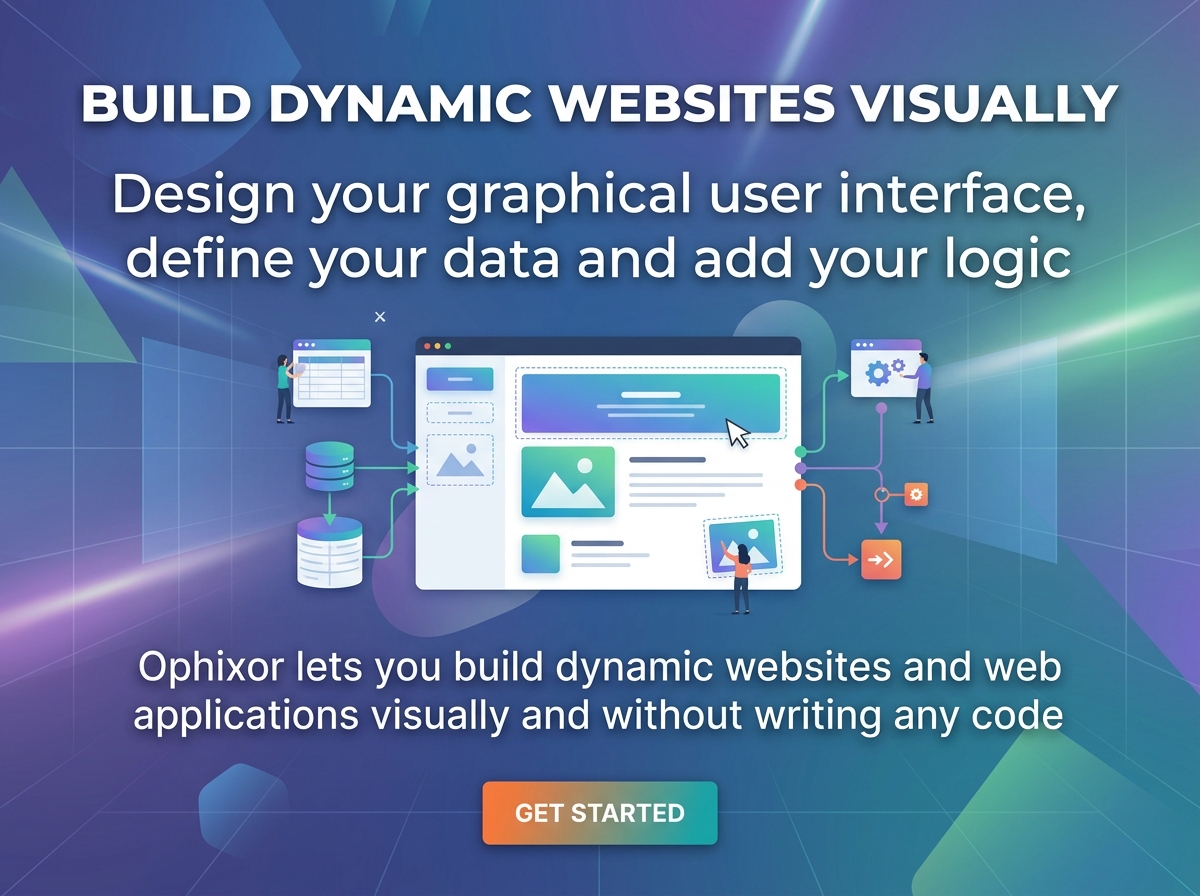
Most visual builders stop where the interesting part begins. You can assemble a polished landing page in an afternoon, but the moment a client asks for a login area, a stored record, or a live feed, you are back in a code editor wiring up a database, an API layer and a deploy pipeline.
Ophixor is aimed squarely at that gap. It is a browser-based visual development environment for building dynamic websites and web applications without writing code, and it treats the usual backend furniture (data models, authentication, real-time channels, third party endpoints) as first class parts of the same canvas you design on.
Before going further, two facts that matter for this Ophixor review. The product is in beta and openly described by its maker as a hobby project at this stage. You can try it for free and there is a demo, but subscriptions cannot currently be purchased and no launch date has been published. That context shapes everything below, and I have tried to be clear about which parts I could verify and which parts are still promises on a roadmap.
What Ophixor Actually Is
Ophixor describes itself as a way to create dynamic websites or web applications visually, without writing code. The homepage puts the same idea more concretely: design your graphical user interface, define your data and add your logic. The interesting word in both versions is dynamic. This is not a static page builder with a nicer drag handle. The underlying argument is that nearly every web product shares the same base parts: a graphical interface, persistent global data, user accounts and authentication, and two-way communication. Ophixor builds its entire toolset around those parts.
Category labels get messy with a product like this. You could reasonably call it a no-code web application builder, a low-code platform for people who still want custom CSS when a property panel runs out, or a dynamic website builder with a backend attached. None of those is wrong. What matters is that Ophixor behaves more like a web app development platform than like the site builders that dominate the visual tool market.
The project started life as PageCraft and was renamed after a name collision. The new name is unique, though by the founder's own admission it does not mean anything in particular. That kind of detail is worth mentioning because it tells you something about the stage of the product: small team, real work, not a venture-funded launch machine.
The workflow Ophixor proposes is deliberately narrow. Instead of the compile, upload, restart cycle that traditional web development involves, you edit, save and publish. The editor lives in the browser, which means no local toolchain and no environment setup. Whether that convenience survives contact with a real project is exactly what this review is about.
The Core Mental Model
Ophixor is built from four ideas that interlock: components for structure, models for data, expressions for values, and actions for behaviour. Once you understand how those four connect, the rest of the platform reads like a coherent system rather than a feature list.
Components: the building blocks
Components are the visual primitives, and the documentation leans on a Lego comparison that is more accurate than most marketing analogies. Blocks combine into structures, but unlike physical blocks each instance can be configured independently.
Every component exposes properties. Most properties hold a value, which can be static or come from a dynamic expression. Some properties represent events instead, and those are configured with actions. Layout related CSS properties can be set separately for mobile, tablet and desktop, so responsiveness is built into the property panel rather than bolted on afterwards.
Two details are easy to miss and worth flagging. First, many components have slots, which let you nest component instances and build your own compositions. Second, any instance can carry custom CSS selectors and properties that cascade to its descendants, which is the escape hatch for the small percentage of visual decisions that no property panel will ever get right.
The component library spans page containers, sections, grids, navigation and menus, cards and dialogs, tables, charts, forms, maps, timelines, ratings and progress bars. There are also variants for many of them, which are effectively preset property bundles. Everything, including your own instances, is defined as JSON with a schema behind it.
Templates: reusable patterns with logic attached
A template is a name plus a component. It can be a single element or a whole composed layout, and it can carry data sources, expressions and actions with it. When you use a template, it behaves like any other component.
This is the part of the platform that most resembles real engineering practice. Building the same card or the same form five times is where visual tools usually become tedious, and templates are the answer to that. They also make the visual logic builder more portable, because behaviour can travel with structure instead of being rebuilt on every page.
Models and data: the backend without the backend
A model is a schema that describes both structure and rules. Structure comes from fields, and rules come from field data types. Ophixor currently ships six types:
| Field type | What it holds |
|---|---|
| boolean | true or false |
| number | integers or floating point values |
| string | text, with a text type of plaintext or rich text, and a line type of single line or multi line for plaintext |
| single | one embedded model with its own fields |
| collection | a list of embedded models, each with their own fields |
| relation | a pointer to another model |
That is a compact set, and for most application shapes it is enough. The distinction between a relation and an embedded model is the one that matters most in practice, because it decides whether records are duplicated or referenced. Getting that wrong early in a project is the visual equivalent of a schema mistake, and it is not something the editor will rescue you from.
Data sits on top of the model and follows its rules. Quotas are tied to your plan, which is covered in the pricing section below.
Data sources: making the interface dynamic
A data source can be attached to any component instance, and everything inside that instance can read from it. Sources can be a model and its data, an expression, or an integration.
The behaviour that matters most: if the data source resolves to an array or collection, the instance is repeated once per item. That single rule replaces a large amount of the templating work that usually requires a framework, and it is the mechanism behind most list, table and feed layouts you would build.
Expressions: values, not code
An expression is either a constant or a function that takes zero or more arguments and returns a value. The built-in library covers constants, math, logic, text, collections, objects, conversion, date and time, component and viewport queries, WebSocket state, Canvas input, platform users, website users and site metadata.
Some of these are more useful than they sound. Viewport expressions such as is mobile, is desktop, width, height and orientation let you branch behaviour without touching media queries. Canvas expressions expose mouse position, key presses, delta time and frames per second, which is what makes the programmable Canvas realistic rather than decorative.
Arguments are mostly allowed to be other compatible expressions, and type checking is deliberately loose. If a parameter needs a boolean and you pass something that returns any, the value is coerced. That is convenient for beginners and mildly alarming for anyone who has spent a week debugging a silently coerced value in a typed language. The tradeoff is conscious, and you should plan for it.
Actions: where the logic lives
Actions are the other half of the logic story. They take zero or more arguments, perform a sequence of operations and return nothing. Everything they accomplish happens as a side effect.
The built-in catalogue is broader than I expected for a beta product:
- Navigation: moving users between pages.
- Components: adding, removing and updating instances at runtime.
- State: adding and setting values in a path addressed state store.
- Flow control: If, For each, Wait, plus Client and Server.
- Communication: sending email and sending HTTP requests.
- WebSockets: connect, disconnect, broadcast, emit, and add, clear or remove data.
- Canvas: circle, line, polygon, rectangle, text, clear, plus save, restore, rotate, scale and translate.
- Users: sign in, sign out, sign up.
- Debugging: print.
Two design decisions stand out. Actions can have conditions, defined as any number of boolean expressions that must all be satisfied before the action runs. And actions can be chained, with the default execution order following the order you specified.
The Client and Server actions are the quiet highlight. They hand the rest of an action sequence to the client or the server, which means the same visual logic can be split across both sides of the wire. Server side logic without writing a server is exactly the kind of promise that makes a no-code web application builder worth considering for real products, and it is also the kind of promise that is easy to overstate. I would want to see it handle authentication checks and secret-bearing requests before calling it production ready.
Integrations, users and WebSockets
An integration is a set of endpoints, and each endpoint carries a schema describing its data shape. You can define your own integrations to reach external services. Users are supported through built-in sign up and sign in templates that you can customise. WebSockets are native, so no-code real-time data applications are on the table rather than bolted on.
All three are gated to the top tier, which is the single most important fact about Ophixor's pricing. More on that below.
The Canvas component
Canvas deserves its own section because it is the feature that separates Ophixor from almost every other visual tool. It is programmable, with drawing actions for shapes and text, transform actions for rotation and scaling, and expressions that expose the frame clock and input state.
In practice that means small games, data visualisations, generative backgrounds, annotation tools and custom chart interactions are all within reach without a separate JavaScript step. It also means you can render things on a canvas that no component library will ever model for you, which is a real answer to the usual complaint that visual builders hit a ceiling.
Design and export
Global design is controlled through CSS variables for colour, shadow, font family, size and weight. That is a sane approach: one place to retheme a project, and output that stays legible if you later hand it to a developer.
Export produces a static version of a page as clean HTML, CSS and JavaScript, and HTML export starts at the Pro tier. The documentation is unusually candid here, and it is the sentence I would underline for anyone planning client work: the export pipeline is limited, some components cannot be exported, and the exported page is a snapshot of the editor page with almost no dynamic functionality and no responsive adaptation. It is a usable starting point, not a migration path.
Building a Small App: What the Workflow Looks Like
I want to give a concrete picture rather than a feature inventory, so here is how the pieces fit for a simple internal tool, a task tracker with a login gate.
You start with a model for tasks: a string field for the title, a string field for the description, a boolean for completion and a relation to a second model for owners. You add data. You build a list page, attach the task model as a data source on a container, and place a card template inside it. Because the source is a collection, the card repeats once per task and each copy reads its own record.
Next, a detail page with a form. Most form components sit in the Personal tier, so inputs, selects, switches, radio groups and text areas are available from the cheapest plan. A button carries an action that writes the new record through state and navigation actions, or forwards it to an external endpoint through an integration if the data belongs somewhere else.
Then the parts that make it an application rather than a document. A sign in and sign up flow built from the provided user templates. A conditional button that only renders for authenticated users. A WebSocket channel pushing task updates between open tabs. Optionally, a canvas panel drawing a small completion chart from the same data.
Every step in that list maps to something documented in Ophixor's reference. What is not documented is the editor experience itself. There is no getting started guide, no tour of the panels, no keyboard shortcut reference, and a fair number of reference entries still read "coming soon", particularly in the logic group, collections, date and time, constants and a few math functions.
For a reviewer that is a problem and an honest one. I can tell you the system is coherent and the primitives are there. I cannot tell you the first hour in the editor feels smooth, because the documentation does not describe that hour and the product is still in flux.
Where Ophixor Genuinely Stands Out
Three things are worth your attention.
The logic model is engineering shaped. Visual logic builders often turn into spaghetti the moment a flow has more than four steps. Ophixor uses actions with conditions, ordered chains and explicit client or server handoff instead of freeform node graphs. It reads like a procedural script, which is a compliment.
State and runtime component mutation are first class. Being able to add, remove and update component instances through actions, alongside a path addressed state store, is the difference between a template engine and an application runtime.
The web platform is included, not integrated. Models, authentication, WebSockets, HTTP requests and email are part of the same product. The pitch about replacing the compile, upload and restart cycle is credible because there is no separate backend to deploy.
The homepage makes seven claims for the product as a whole: dynamic applications rather than static sites, clean HTML and CSS and JavaScript export, WebSocket powered applications, your own integrations, interactive Canvas experiences, an authentication system you control, and global design tokens. Four of those seven are Pro Gold only, namely WebSockets, integrations, Canvas and users with authentication. Export starts at Pro. Only the visual designer, the design system and hosted publishing are available on the $19 plan. That distribution decides which tier a real project lands on, and it matters more than any single feature in the list.
Where It Falls Short Right Now
A review that only lists strengths is a brochure, so here is the other side.
It is beta, and openly a hobby project. The site's own words: "Right now Ophixor is in a beta phase and is actively being developed. You cannot purchase a subscription and when this will be available is not known at this point in time." That is refreshingly direct, and it is also a hard stop. If you are choosing a platform for a client project with a deadline this quarter, that sentence should end the evaluation. Coverage outside the product's own site is just as thin. A Peerlist project page is about the extent of what I could find, which is normal for a beta built by a small team and also means there is no independent track record to lean on.
The export is a snapshot. No responsive adaptation, limited component coverage, almost no dynamic behaviour. You are not buying an exit hatch yet, and the documentation says so plainly.
You cannot extend the primitives. Components, expressions and actions are defined by JSON schemas and users cannot create their own. The Element component exists as a fallback for layouts the library cannot express, and it is gated to the top tier. This keeps the system coherent, but it also means you are waiting on the maker when you hit a wall.
The best features sit behind a $499 per month tier. WebSockets, user accounts and authentication, Canvas and runtime component mutation are all Pro Gold. That leaves the middle tier in an odd position: it can build data driven pages, but not the interactive, multi-user, real-time things that make the pitch compelling.
Documentation is uneven. Large parts of the reference are stubs. For a visual tool where discoverability depends on documentation, that is the biggest practical friction I found.
Hosting details are unpublished. Hosted publishing is listed on the Personal plan, but there is no public information on custom domains, SSL, or what happens to a published site if the beta changes direction.
Pricing: What Each Tier Unlocks
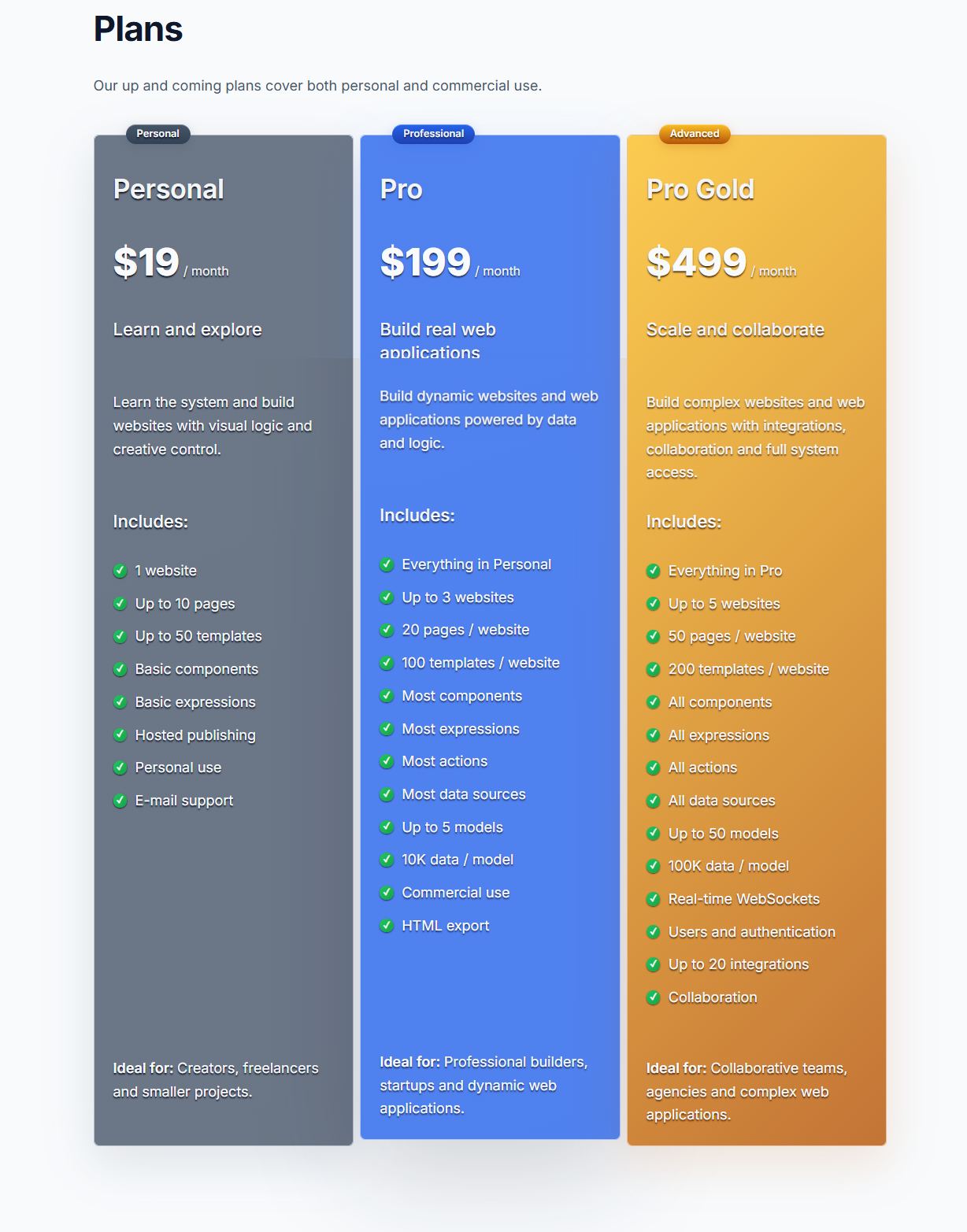
Here are the three plans as the homepage lists them, taglines included. Note that the standalone pricing page is still a placeholder at the time of writing, and the site states plainly that you cannot purchase a subscription right now.
| Plan | Price | Websites | Pages | Templates | Models and data | Notable extras |
|---|---|---|---|---|---|---|
| Personal | $19/mo | 1 | 10 | 50 | Not listed | Basic components and expressions, hosted publishing, personal use, email support |
| Pro | $199/mo | 3 | 20 per site | 100 per site | 5 models, 10K data items per model | Most components, expressions, actions and data sources, commercial use, HTML export |
| Pro Gold | $499/mo | 5 | 50 per site | 200 per site | 50 models, 100K data items per model | All components, expressions, actions and data sources, WebSockets, users and auth, up to 20 integrations, collaboration |
The taglines give away how the maker thinks about the ladder. Personal is labelled learn and explore, Pro is labelled build real web applications, and Pro Gold is labelled scale and collaborate. The limits scale with them on websites, pages and templates, and the data quota is expressed per model rather than per account, which is the more sensible choice for this kind of tool.
The Personal tier is a learning plan. Ten pages and basic components will not host a real product, and data models are not mentioned at all at that level, which suggests dynamic apps start at Pro.
Pro at $199 per month is the number that will decide whether this product finds a market. Compare it with the cost of a backend developer for a week and it looks reasonable. Compare it with the no-code tools most freelancers already pay for and it looks expensive, especially while the export is limited and the documentation is incomplete.
Pro Gold at $499 per month is agency and team pricing, and it is also where the only genuinely differentiated features live. Collaboration being exclusive to this tier is defensible. WebSockets and authentication being exclusive is harder to justify, because without them you are building a dynamic brochure.
Ophixor vs Other Approaches
Rather than invent competitor scorecards, here is the honest comparison against the three categories people will actually weigh.
| Dimension | Ophixor | Static site builders | Node based app builders |
|---|---|---|---|
| Structure | Component tree with slots and templates | Sections and blocks | Screens and flows |
| Data | Models with typed fields, relations and quotas | Usually collections only | External database or spreadsheet |
| Logic | Actions with conditions and ordered chains | Limited or none | Visual node graphs |
| Real time | Native WebSockets on the top tier | Rare | Plugin or external service |
| Auth | Built-in user templates on the top tier | Not typical | Often available |
| Export | Static HTML, CSS and JS, currently limited | Static output | Varies widely |
The node based category is more mature and better documented. Ophixor's bet is that procedure shaped logic and tight data modelling beat sprawling graphs. That is a defensible bet, and it is the main reason the product is interesting even in beta.
Who Should Try It
Reasonable fits:
- Indie hackers who want to validate an application idea without standing up a backend.
- Freelancers building internal tools, dashboards and client portals where the data model is simple.
- UI and UX designers who want to ship interactive prototypes with real state and real records instead of clickable mockups.
- Agile product teams that need a working demo in front of stakeholders this week.
- Anyone curious about Canvas driven visuals without learning a rendering library.
Poor fits:
- Marketing teams who need a fast static site with blogging and SEO tooling.
- Teams with a hard deadline and a client contract attached.
- Projects that depend on exporting clean code to a separate codebase.
- Products that need custom primitives beyond what the schema exposes.
FAQ
Is Ophixor free to use?
You can try it for free and there is a public demo. Paid subscriptions are not currently purchasable because the product is in beta, so no paid plan is being sold at this time.
Do I need to know HTML or CSS to use Ophixor?
No. The stated goal is building dynamic sites and applications without writing code. That said, the design system is built on global CSS variables and instances accept custom CSS, so a working understanding of CSS helps when you want precise control. Exports come out as HTML, CSS and JavaScript, which is useful if you later hand the project to a developer.
Can I build a real application with users and a database?
Yes in principle. Models with typed fields handle stored data, and built-in sign up and sign in templates handle accounts. Both capabilities are tied to the Pro Gold plan, and the product is still in beta, so treat production use with care.
Does Ophixor support real time features?
It supports WebSockets natively, with actions to connect, disconnect, broadcast and emit, plus expressions that expose WebSocket state. The documentation also covers a programmable Canvas with drawing and transform actions, which is uncommon in this category.
Can I connect Ophixor to external services?
Yes through integrations. An integration is a collection of endpoints, each with a schema describing its data. You can define your own, and the Pro Gold plan lists support for up to 20 integrations.
Can I export my project and host it elsewhere?
HTML export is available from the Pro plan, and the output is clean HTML, CSS and JavaScript. The documentation is direct about the limitations: the pipeline is currently limited, some components cannot be exported, and exported pages are static snapshots without responsive adaptation. Plan on hosted publishing being the primary route for now.
Is Ophixor ready for client work?
Not yet, unless you have room for risk. Subscriptions cannot be purchased, the export path is incomplete, and the documentation has gaps. It is a strong tool to evaluate and prototype with, not a platform to promise a delivery date on.
How is Ophixor different from a normal website builder?
A normal builder produces pages. Ophixor adds data models with relations and embedded collections, expression driven properties, ordered action chains, user accounts, HTTP and email actions, WebSockets and a programmable Canvas. The difference shows up the moment your project needs to remember something between visits.
Final Verdict
Ophixor is the most interesting visual web development environment I have looked at this year, and also one of the least finished. The architecture is unusually serious for a hobby project: typed models with relations and embedded collections, expression driven properties, ordered action chains with server and client handoff, runtime component mutation, programmable Canvas and native WebSockets. Very few tools in this category have all of those in one place.
The hesitation is entirely about timing. Subscriptions are not available, the export is explicitly limited, and a meaningful share of the reference documentation is still a stub. Recommending it for production work today would be irresponsible. Recommending it as a free trial and a demo, especially for anyone who has hit the ceiling of simpler builders, is easy.
My advice: build one small app in the demo, specifically one that needs a model, a repeated list, an action chain and a login. If that flows well for you, keep an eye on the beta and revisit when billing opens. If the editor feels rough, you have lost an afternoon and learned something about where visual development is heading.
Review Summary
- Concept and architecture: 4.5/5
- Feature depth for a beta: 3.5/5
- Documentation and onboarding: 2.5/5
- Pricing and packaging logic: 3/5
- Value for money at Pro: 3.5/5
- Overall: 3.7/5
Want to judge it yourself? Try the free demo and sign up at ophixor.com. It costs nothing to test, and the demo is the only reliable way to assess the editor while the documentation catches up.
Tags
# Review# Ophixor# visual web development# no-code web application builder# low-code platform# dynamic website builder# visual logic builder# WebSockets no-code# web app development platform# Ophixor review# no-code backend# visual development environment# build web apps without code# expressions and actions# data models no-code# component templates# user authentication no-code# programmable Canvas component# export HTML CSS JavaScript# Ophixor pricing# beta no-code builder# internal tools without code# real-time web apps# third party integrations# responsive visual editor# indie hackers# freelance web development# agile product teams# Ophixor alternatives# ReviewFollow for new blogs
Subscribe to our blog
Subscribe to Newsletter
Subscribe to our newsletter to get the best products weekly.