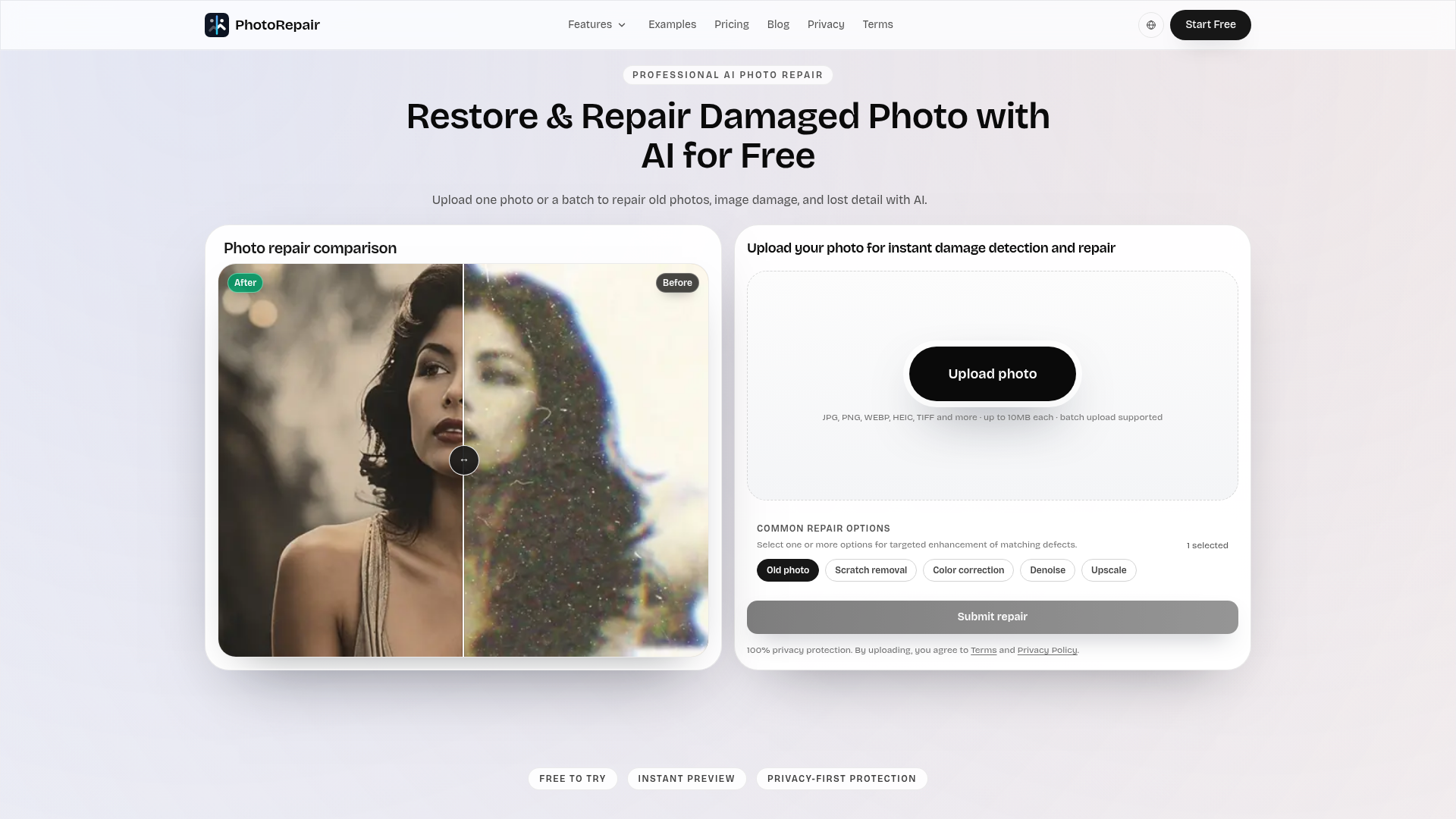
PhotoRepair is a professional AI-powered online tool designed to restore and repair damaged photos with remarkable accuracy and natural results. It leverages advanced artificial intelligence to fix common image issues such as scratches, blur, fading, and low resolution, making it ideal for preserving cherished memories. The service targets anyone looking to revitalize old family photos, improve scanned images, or enhance portraits for sharing and printing.
Key Features:
PhotoRepair is exceptionally beneficial for restoring old family albums, digitizing faded prints, and improving the clarity of blurry scans. Users can upload images suffering from creased marks, linear scratches, or general wear and tear, and the AI will intelligently reconstruct missing details while preserving original textures. It's also perfect for enhancing portraits by clarifying facial details and contours without creating an artificial "plastic" look.
For photographers or individuals with a collection of low-resolution images, the upscale feature can significantly improve perceived resolution, making photos clearer for social media or light printing. The color restoration tool brings back washed-out tones, ensuring historical photos regain their original vibrancy and emotional impact.
Pricing Information:
PhotoRepair operates on a freemium model, offering a free trial that allows users to upload a photo and preview the instant before/after results without a credit card. Full-resolution downloads require credits, which can be purchased through Starter or Pro credit packs, providing a pay-as-you-go structure.
User Experience and Support:
The platform boasts a clean, intuitive browser-based workflow, making photo repair accessible to everyone. Users simply upload their image, select the most relevant AI repair mode, and review a realistic before-and-after preview before committing to a download. This transparent process builds trust and ensures satisfaction. While specific documentation isn't detailed, the clear step-by-step process and mode descriptions guide users effectively. Support is available via support@photorepair.app.
Technical Details:
PhotoRepair utilizes professional AI algorithms specifically trained for image restoration and enhancement. The entire process is browser-based, ensuring accessibility from any device without the need for local software installations. The AI focuses on recovering clean edges, balanced tones, and realistic textures, avoiding common pitfalls of aggressive digital filters.
Pros:
PhotoRepair offers a powerful and accessible solution for anyone looking to restore and enhance their damaged or old photos with professional-grade AI. Its focus on natural results, ease of use, and privacy makes it an excellent choice for preserving visual memories. Explore PhotoRepair today to bring your cherished images back to life.
Key Features:
- AI-powered damage detection and repair for various defects.
- Targeted repair modes for scratches, blur, fading, noise, and portrait enhancement.
- Support for multiple image formats including JPG, PNG, WEBP, HEIC, TIFF, and BMP.
- Browser-based workflow requiring no software installation.
- High-definition output suitable for archiving, sharing, and print preparation.
- Privacy-first processing with automated deletion of uploaded images within 24 hours.
PhotoRepair is exceptionally beneficial for restoring old family albums, digitizing faded prints, and improving the clarity of blurry scans. Users can upload images suffering from creased marks, linear scratches, or general wear and tear, and the AI will intelligently reconstruct missing details while preserving original textures. It's also perfect for enhancing portraits by clarifying facial details and contours without creating an artificial "plastic" look.
For photographers or individuals with a collection of low-resolution images, the upscale feature can significantly improve perceived resolution, making photos clearer for social media or light printing. The color restoration tool brings back washed-out tones, ensuring historical photos regain their original vibrancy and emotional impact.
Pricing Information:
PhotoRepair operates on a freemium model, offering a free trial that allows users to upload a photo and preview the instant before/after results without a credit card. Full-resolution downloads require credits, which can be purchased through Starter or Pro credit packs, providing a pay-as-you-go structure.
User Experience and Support:
The platform boasts a clean, intuitive browser-based workflow, making photo repair accessible to everyone. Users simply upload their image, select the most relevant AI repair mode, and review a realistic before-and-after preview before committing to a download. This transparent process builds trust and ensures satisfaction. While specific documentation isn't detailed, the clear step-by-step process and mode descriptions guide users effectively. Support is available via support@photorepair.app.
Technical Details:
PhotoRepair utilizes professional AI algorithms specifically trained for image restoration and enhancement. The entire process is browser-based, ensuring accessibility from any device without the need for local software installations. The AI focuses on recovering clean edges, balanced tones, and realistic textures, avoiding common pitfalls of aggressive digital filters.
Pros:
- High-quality, natural-looking AI-driven repairs.
- Versatile for various damage types (scratches, blur, fade, low-res).
- User-friendly, browser-based interface.
- Strong privacy protection with automatic data deletion.
- Free preview allows validation before purchase.
- Very severely damaged images may still have limitations in full recovery.
- Requires an account for the free trial and full downloads.
- No explicit mention of advanced manual controls for fine-tuning.
PhotoRepair offers a powerful and accessible solution for anyone looking to restore and enhance their damaged or old photos with professional-grade AI. Its focus on natural results, ease of use, and privacy makes it an excellent choice for preserving visual memories. Explore PhotoRepair today to bring your cherished images back to life.
Comments
Publisher

Launch Date2026-10-05
Platformweb
Pricingfreemium
Tech Stack
#AI#web
Sponsors

Boost Domain Rating
Raise your Ahrefs Domain Rating with 5 - 50 dofollow backlinks from DR 30–60 sites — from $50, guaranteed to improve your DR or your money back.
Nick Launches
A launch platform for builders —> Get discovered, get a backlink.
Become a Sponsor
Get your brand featured here
Outbid
View🥇 🥈
🥈 🥉
🥉
Want this spot? Pay what you wantSubmit Your Startup to 100+ Directories | Submitator
Automated startup directory submission service. Get listed on Product Hunt, BetaList, Indie Hackers & 100+ directories for SEO backlinks and DR boost. From $29.
$40
Boost Your Domain Rating — DoFollow Backlinks (DR 30–70) from $30
Raise your Ahrefs Domain Rating with 5 - 50 dofollow backlinks from DR 30–60 sites — from $50, guaranteed to improve your DR or your money back.
$35
DirEasy - The Best Directory Boilerplate with AI | DirEasy
The best directory boilerplate, packed with AI, Listings, Payment, Submission, CMS, Blog, Authentication, Newsletter, SEO and more.
$30