Amazon SEO Ranking Review - Amazon SEO Tool, Tested
Amazon SEO Ranking Review - Amazon SEO Tool, Tested
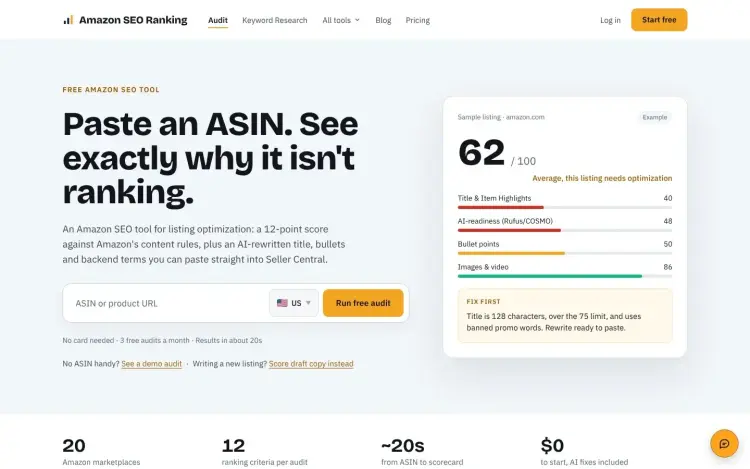
Amazon caps most product titles at 75 characters, scores a live listing against 12 criteria, and turns the result into one number out of 100. The number is the least useful part. What sits under it is a list of failed checks sorted by the points each one can win back, and that list is why this tool is worth a look.
Amazon listing optimization is the only job it takes on. A live ASIN produces a scorecard in roughly 20 seconds, with replacement copy and keyword data attached. Whether that is worth paying for depends on what you already run.
What Amazon SEO Ranking is
The product lives at amazonseoranking.com and is a focused Amazon SEO tool rather than a seller suite. It is built around one job: making a single Amazon listing rank and convert better. There is no product research database, no PPC manager, no inventory forecasting. Paste an ASIN or a product URL, pick the marketplace, and the tool pulls the live page.
Two constraints apply to every audit:
- The audit is read-only. It reads the public product page. It does not connect to Seller Central and it cannot change anything on Amazon. You copy the rewrites into Seller Central yourself.
- The company states it is not affiliated with Amazon.com, Inc. That matters for how you treat the scoring. It is one vendor's interpretation of Amazon's published content rules, not an official Amazon score.
The audit is free to try: the free plan gives you three full audits a month with no card, and there is a demo that needs no account.
The 12-point audit
Twelve criteria across seven categories, each weighted the same. The published categories are:
| Category | What it looks at |
|---|---|
| Title & Item Highlights | Length against the 75-character title cap, keyword placement, promo language, and the Item Highlights summary |
| Bullet Points | How many bullets there are, how they open, whether they repeat the title |
| Images & Video | Image count and whether video is present |
| Backend & Attributes | Backend search terms and the attribute fields behind the page |
| Reviews & Social Proof | Rating count and star rating as shown on the live page |
| Stock & Fulfillment | Availability and Prime eligibility |
| AI-Readiness (Rufus/COSMO) | How well the copy holds up for Amazon's AI shopping features, Rufus and COSMO |
Scores run 0 to 100, as the average of those criteria. Objective facts such as image count, star rating, and Prime status come straight from the live page; the qualitative calls are scored against Amazon's current content rules.
Criteria that cannot be verified get dropped from the calculation rather than scored as a failure. Prime eligibility is the usual example outside the US, where Amazon does not always return that data. Those points are redistributed across the remaining criteria, which keeps a marketplace data gap from quietly tanking the score.
Scores are cached for 15 minutes per ASIN. Audit the same listing twice in that window and you get the same snapshot back, so you are not burning quota to refresh a page you just checked.
The fix list is the real feature
Each failed criterion becomes a line item tagged with the points it can recover, for example "Title, +8 pts", plus a priority flag and a rewrite you can paste.
For a first-time seller, the ordering is the useful part. Instead of reading a checklist top to bottom, you work down a list sorted by return. If your images already sit at 86/100 and your title is at 40, the tool tells you to leave the images alone and fix the title.
The 75-character title limit
Since 27 July 2026, most Amazon categories cap titles at 75 characters including spaces, down from roughly 200. Media categories are exempt. Titles that run long are no longer only flagged: Amazon rewrites them, which means a model decides which of your keywords survive.
That change explains why the Item Highlights field exists. It carries 125 characters of the information that no longer fits in the title, and the audit scores it as part of the same category. Many sellers leave it empty, which is the gap the field was added to close.
Backend search terms hold 249 bytes on most marketplaces. Going over the limit makes Amazon ignore the entire line rather than trim it, so every term in that field is lost at once. Padding it just in case is a bad trade.
A template written for 200-character titles fails the first check immediately. If you are reusing old copy, check the title length before anything else.
23 marketplaces, judged locally
The tool covers 23 Amazon storefronts: US, Canada, Mexico, Brazil, UK, Ireland, Germany, France, Italy, Spain, Netherlands, Belgium, Sweden, Poland, Turkey, UAE, Saudi Arabia, India, Japan, Singapore, Australia, Egypt, and South Africa. Austria is handled through amazon.de.
A .de listing is pulled live and judged against German rules, and the same ASIN can score differently across storefronts because copy, images, reviews, and Prime status are separate per marketplace. Selling in several countries means auditing each one; a good US score does not travel.
AI Copy Rewriter with the limits enforced
The rewriter runs inside the audit. It produces a title, Item Highlights, five bullets, a description, and backend search terms, and it is included on every plan, Free included.
It enforces four limits:
- Title: generated inside the character limit, with all-caps words and promotional phrases like "Sale 50% Off" stripped before you see the copy.
- Item Highlights: filled instead of left blank, which is the field many sellers skip.
- Bullets: exactly five, one per line, with the payload inside the first 200 characters so it survives mobile truncation. All-caps lead-ins get flagged, since Amazon now treats those as a style problem.
- Backend search terms: checked for repetition and kept inside the byte budget, since an over-limit field is ignored rather than trimmed.
Copy comes out in the language of the marketplace you audited. Audit a .de listing and you get German, not English you have to translate yourself.
Draft scoring before you publish
Paste a proposed title and bullets into the audit, leave the fields you have not written yet blank, and score the draft. Blank fields fall back to the live copy, while images, rating, and Prime status always come from the live page.
You get a before and after number without touching Amazon. The catch is that a draft audit consumes one audit from your monthly allowance and is not saved to your history.
The view also flags specific problems: a title over the limit, promo language, keyword stuffing, or a mismatch between the pack count in the title and the pack count in the specifications. That last one matters more than it sounds. A listing that says 2-pack in the title and ships one unit generates returns and bad reviews, and no amount of keyword optimization fixes it.
Amazon keyword research inside the same tool
Queries run against Amazon search data rather than Google.
Volume estimates, keyword ideas, a relevance grade, and competitor views. That set suits listing work, where a short list you can defend beats a database to browse.
The volume numbers are estimates
Amazon does not publish exact search counts. Every third party figure, including these, comes from a model, and the site marks its numbers as approximations rather than presenting them as fact.
Vendor numbers spread widely. In the site's own keyword write-up, one term came back as roughly 38,000 monthly searches in MerchantWords and 14,634 in Helium 10. The site attributes the gap to how each vendor counts and models. Compare keywords inside one tool, not across two.
Search volume estimates cover 16 markets. The advanced tools sit in four: the US, Egypt, Saudi Arabia, and the UAE. Audits still cover all 23 storefronts, so a German seller can audit a .de listing but cannot run the same depth of keyword analysis on it.
Relevant keywords versus a longer list
A "water bottle" search returned 112 keywords, grouped into close match and related buckets. Of the top 40 by volume, 19 were unusable: 9 contained other brands such as Yeti, Stanley, and Hydro Flask, and 10 referred to bottled drinking water rather than a reusable bottle.
Brand terms are the biggest trap, and the guide makes the reason explicit: using them in your listing breaches Amazon's search term rules and invites a trademark complaint. The tool grades relevance and can exclude brand terms from a competitor comparison, which keeps them out of the list you work from.
Where each keyword goes
Volume is half the job. Placement is the other half, and each field has a different capacity:
| Field | Limit | What belongs there |
|---|---|---|
| Title | 75 characters | One primary keyword plus one or two modifiers |
| Item Highlights | 125 characters | Secondary phrases that did not fit the title |
| Bullets | 5 bullets, 255 hard cap, 200 recommended | Benefits with supporting terms, front-loaded for mobile |
| Description | Around 2,000 characters | Synonyms and context that would be clumsy elsewhere |
| Backend search terms | 249 bytes | Only terms not already used above, plus spelling variants |
Backend terms are easy to waste. Anything already in the title or bullets is redundant there, so a few repeated words can crowd out the terms you actually needed.
Reverse ASIN and keyword gap
"What I rank for" takes any ASIN and returns the terms it ranks for, so you can point it at a rival instead of your own product. The competitor view puts listings side by side.
Keyword gap is Agency only. It compares up to 20 ASINs at once, filters into your gaps versus your wins, and can strip brand terms before comparing. For an agency handing a client a list of terms a rival owns and the client does not, that is the shortest path from data to a deliverable.
All of these work in the same four markets, so competitor analysis for a UK or German listing is not available at the time of writing.
Plan limits
Pro includes 2,000 keyword lookups a month and Agency 10,000. Free accounts get previews rather than full lists, around 30 a month. There is also a separate free keyword tool if you only need a quick check.
If keyword data is the only thing you need, the best Amazon keyword research tool for you is probably a dedicated one with unlimited queries. If you want the audit and the rewrite in one screen, this saves the hop.
Pricing: what you actually get
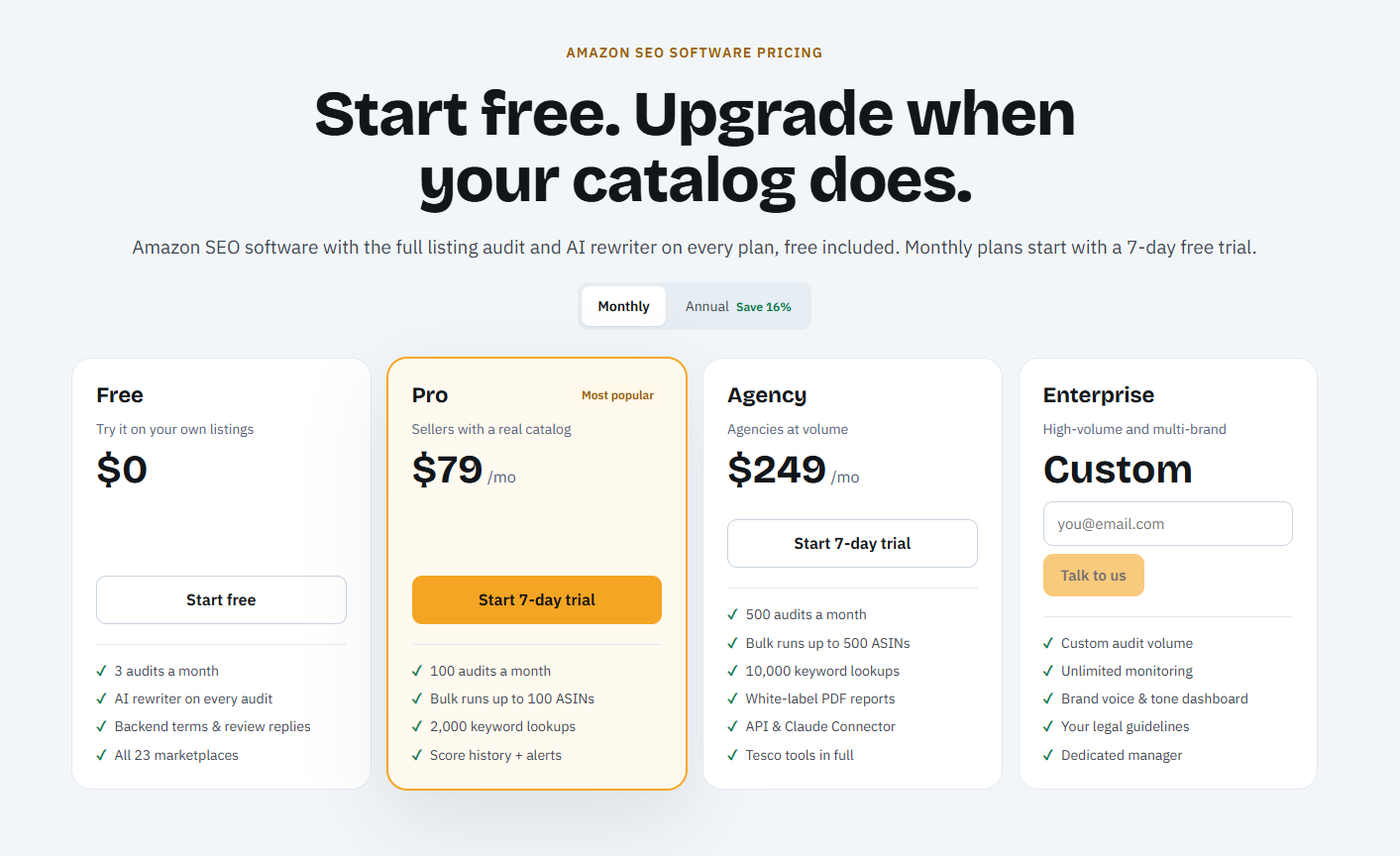
Four plans, from a free tier to a custom Enterprise contract:
| Plan | Price | Audits per month | Bulk limit | Keyword lookups | Notable extras |
|---|---|---|---|---|---|
| Free | $0 | 3 | None | Previews | Full audits with AI rewrites, all 23 marketplaces, no card |
| Pro | $79/mo | 100 | 100 ASINs | 2,000 | Score history, alerts for 5 listings, compliance scan, image audit, A+ content, localized rewrites |
| Agency | $249/mo | 500 | 500 ASINs | 10,000 | White-label PDF reports, API and Claude connector, keyword gap, alerts for 25 listings |
| Enterprise | Custom | Custom | Custom | Custom | Unlimited monitoring, brand tone dashboard, in-house legal rules, account manager |
Billing details that are easy to miss:
- Monthly plans include a 7-day free trial on Pro and Agency. Annual billing has no trial but carries a 14-day refund window.
- Annual billing saves 16 percent over monthly.
- Audit and keyword allowances reset on the 1st of the month and do not roll over.
- You can cancel any time. Upgrades apply immediately with a pro-rated difference, downgrades apply at the end of the paid period.
- Business invoices with a VAT number are supported at checkout.
One entitlement is easy to misread: the pricing page lists Competitor Comparison on every plan, while Keyword gap sits on Agency.
At $79, the question is whether listing work is the bottleneck. A suite costs more because it does more, and this is a second subscription for anyone already paying for one.
Bulk audits across a catalog
Pro runs batches of up to 100 ASINs. Agency raises that to 500 and adds white-label PDF reports, API access, and a Claude connector. Each listing in a batch consumes one audit, so the audit count, not the batch size, is the real ceiling. On Agency, 500 audits covers a full catalog pass, and the $249 monthly price works out to roughly $0.50 per listing.
Free tools that need no account
Beyond the free audits, four standalone resources are worth bookmarking, especially if you are not ready to subscribe. All four are free and need no sign-up, and the two checkers run in your browser, so the copy you paste is not uploaded anywhere.
Character Limit Checker (amazonseoranking.com/listing-rules). Paste a title, Item Highlights, bullets, and description and it checks them as you type: 75 characters for the title, 125 for Item Highlights, 255 per bullet, 2,000 for the description. It also flags promotional words such as best, cheap, free shipping, or guarantee, decorative symbols and emoji, any word used more than twice, all-caps text, and a bullet count below five. The result reads like "breaks 7 rules" with a before and after example, which makes it a decent pre-publish lint even if you never buy a plan.
Backend Keyword Checker (amazonseoranking.com/backend-terms). Paste your backend terms alongside the title and bullets and it shows how much of the 249 bytes you have used, which terms duplicate visible copy, and which look risky, such as brand names, ASINs, or subjective claims. Byte counting matters here, since accented characters and symbols cost more than one byte each, so a field that looks short can already be over.
Product Image Requirements (amazon-image-requirements). A reference page rather than a checker: pure white background, product filling about 85 percent of the frame, at least 1,000 pixels on the longest side to enable zoom, no text, logo, or watermark on the main image, plus gallery guidance on the seven-plus images worth adding.
Fix a Hidden Listing (search suppressed on Amazon). Another reference page, this one on diagnosing a listing that has dropped out of search entirely, the common triggers, and the order to fix them in.
None of these scores a listing, ranks fixes by value, or rewrites copy; that is the paid product. They are also the vendor's reading of Amazon's rules, so check the category style guide in Seller Central before a large change.
If you want to see where your own listing loses points, the free audit takes about 20 seconds and needs no card.
How it compares to the main competitors
In the site's comparisons, the best Amazon SEO tools split between full suites and specialist listing tools, with listed prices from $39 to $490 a month.
| Tool | Listing score format | Amazon keyword research | Wider seller toolkit | Published price |
|---|---|---|---|---|
| Amazon SEO Ranking | 0 to 100, 12 published equal criteria | Yes, volume in 16 markets, gap in 4 | None, listing only | Free, $79, $249 |
| Helium 10 | 1 to 10 Listing Analyzer, 50 runs a month on Platinum | Yes, Cerebro and Magnet | Product research, PPC, inventory | $129, $359 |
| Jungle Scout | Listing Quality Score | Yes | Product database, supplier tools | $49 to $149 |
| SellerApp | Two-part listing quality index | Yes, 18+ markets | PPC automation and tracking | $99 to $250 |
| ZonGuru | Keyword placement score | Yes | Research, review requests, inventory | From $49, rises with SKU count |
| DataDive | Not compared | Yes, niche keyword tables | Data only | $39 to $490 |
"Not compared" means the site's own comparison does not cover that dimension. Prices and feature summaries are what the vendors published in late 2026, as compiled in the site's comparisons rather than checked on each vendor's own pricing page; they move, so check before signing up.
Score formats differ. Helium 10 scores listings on a 1 to 10 scale, Jungle Scout uses a Listing Quality Score, SellerApp runs a two-part index, and SmartScout grades on lettered dimensions. Amazon SEO Ranking publishes its 12 criteria and weights them equally at roughly 8.3 points each, which makes a score reproducible and, more practically, explainable to a client. Whether that matters depends on whether you have to defend a score to someone else. The site makes the same argument in its own listing quality check roundup, worth reading as a vendor's view rather than a neutral test.
Price per listing is where the tiers separate. According to the site's October 2026 comparison, Helium 10's Platinum plan at $129 includes 50 Listing Analyzer runs a month, so a 100-SKU catalog needs a higher tier or a second tool. Pro here gives 100 audits for $79. Diamond at $359 adds 150 analyses plus the PPC, research, and inventory stack, and if you need that stack it is the better buy. The site has its own head-to-head with Helium 10 if you want the case made at length, keeping in mind who wrote it.
Coverage differs too. The site puts Helium 10's listing analyzer at 10 marketplaces. This one checks 23, and it writes the rewrites in the local language, which matters if you sell in Poland or the UAE.
Helium 10 and Jungle Scout are built around finding products to sell, with listing tools as one module inside a much larger product. This tool does one module in more depth, which is either exactly what you want or a subscription too many.
Speed is where it separates from a suite. A seller who wants to know why one listing is not ranking gets an answer in 20 seconds without learning a dashboard. A seller who wants sales estimates for a niche gets nothing here and should be in DataDive or Jungle Scout.
What is missing
The product does not estimate sales, manage ads, or track rankings daily.
No sales estimates, PPC, or inventory. You cannot size a niche, manage campaigns, or plan a restock here. Those live in Jungle Scout, DataDive, or a suite.
No Seller Central integration. Everything is manual copy and paste, which is real labor across a 500-ASIN catalog. An API exists on Agency, but nothing in the product pushes copy to Amazon.
The pass thresholds are not published. The site names the seven categories and states that criteria are equally weighted, but it does not spell out exactly what each of the 12 checks must clear. You can see which category lost points and how many, and the reason is written in plain language, but you cannot audit the audit.
Subjective scoring by AI. Title quality and bullet structure are judged by a model, not by a deterministic rule set. Unchanged content should return the same score, but a model in the loop always carries some variance. Treat scores as directional, not certified.
No daily rank tracking. Ranking data is a snapshot, with no scheduled tracking, rank-drop alerts, ad rank, or index checker. On Agency, ranking visibility refreshes no more often than once a week. Keep Helium 10, DataDive, or SmartScout for the daily curve.
Three gaps are smaller but worth knowing. Monitoring only fires when a score moves, capped at 5 listings on Pro and 25 on Agency, with no hijacker, Buy Box, price, or review alerts and no account health data; pair it with SellerSonar, AmzMonitor, or Keepa if those matter. Advanced keyword tools stop at four markets even though volume covers 16. Review requests are not automated at all, though you can draft replies to reviews you already have.
Who it is for, and who should skip it
Sellers and brand owners who want a listing to rank and convert better. That is the whole use case: audit, work the fix list, rewrite, publish, re-audit. Three free audits a month is enough to try that loop on your own ASIN.
Beginners who need to know what to fix first. A list sorted by recoverable points gives a clearer starting point than a dashboard with twenty-odd tools you have not learned yet.
Experienced sellers cleaning up a catalog. Pro runs 100 audits a month and batches up to 100 ASINs; Agency raises both to 500.
Agencies and freelancers managing listings for several clients. White-label PDF reports, API access, and 500 audits for $249 work out to about $0.50 a listing.
Three groups should look elsewhere:
Sellers who need product research. If your problem is picking what to sell, this tool cannot help. Buy Jungle Scout or DataDive.
Anyone who wants changes pushed automatically. Nothing in the product writes to Amazon, so if you need automated listing management, look elsewhere.
Enterprise teams that need a documented methodology. The thresholds behind each criterion are not published, which is a problem if your process requires an auditable scoring standard.
FAQ
Is there a free plan? Yes. Three full audits per month including AI rewrites, all 23 marketplaces, no credit card. Demo audits need no account at all.
Are there free tools I can use without an account? Yes. A character limit checker and a backend keyword checker both run in the browser with no sign-up, and there are free guides to product image requirements and search-suppressed listings.
Does it work outside the US? Yes, 23 storefronts are supported and each listing is judged against its own marketplace rules, so the same ASIN can score differently by country.
Does it connect to my Seller Central account? No. The audit reads the public product page and never modifies your listing. You copy the rewrites in yourself.
What are Item Highlights? An Amazon field of up to 125 characters that sits under the title and now carries detail that no longer fits inside the 75-character title limit. It is scored as part of the title category, so leaving it empty costs points.
Is the 100-point score an official Amazon metric? No. The tool states it is not affiliated with Amazon, and the score is its own interpretation of Amazon's published content rules. Treat it as a consistent internal benchmark rather than a number Amazon recognizes.
Does it track keyword rankings every day? No. It gives you a ranking snapshot for an ASIN, not a daily history, and there are no rank-drop alerts or ad rank data. That is the main reason to keep a dedicated Amazon rank tracker alongside it.
Can it show which keywords a competitor ranks for? Yes. "What I rank for" is listed on Pro, and the pricing page shows a Competitor Comparison view on every plan. Keyword gap is Agency only, up to 20 ASINs at a time. All of these work in the US, Egypt, Saudi Arabia, and the UAE only.
Will Amazon penalize AI-generated copy? The rules the tool checks are about the copy itself: length limits, no promotional claims, no keyword stuffing, no all-caps. The rewriter enforces those, but the review step is still yours, so read the copy before you paste it.
How accurate are the search volume estimates? They are modeled estimates, not Amazon-reported figures. Amazon's own Brand Analytics gives a search frequency rank rather than a monthly volume, which is why every third party number is an estimate. Use them for relative comparison between keywords.
Can it replace Helium 10 or Jungle Scout? No. Those are full seller suites. This is a focused Amazon SEO tool for listing audits and rewrites, so treat it as an addition to a suite rather than a replacement.
Is Amazon SEO Ranking worth it? For a seller who cannot explain why a specific listing underperforms, yes. Pro costs $79 a month with a 7-day trial. If you already pay for a suite with a usable listing audit, run the three free audits first and check whether the scorecard tells you anything the suite did not.
What counts as one audit? One live listing pull scored against the 12 criteria, including the AI rewrites. Draft audits, every listing inside a bulk run, and each ASIN lookup in the reverse ASIN tools consume one audit each. Plain keyword volume lookups come out of the separate keyword allowance instead.
Do unused audits roll over? No. Allowances reset on the 1st of the month.
Verdict
How I would use it
Audit the five listings that drive most of your revenue. Work down each fix list in point order, ignoring anything below a few points until the big items are done. Draft-score the new copy before publishing, publish manually in Seller Central, leave it two weeks, then re-audit and compare. Once the top listings are clean, run a bulk pass on the rest of the catalog at 100 ASINs per batch.
Its case is narrow and easy to state: it tells you which fixes are worth doing, then writes them. The audit is transparent about what it measures, the fix list is ordered by return, and the rewriter respects the limits sellers trip over. The 23-marketplace coverage and the three-audit free tier are the two things to try first.
What it does not do is just as clear: no sales data, no PPC, no rank tracking, no published thresholds. It is a diagnostic and copywriting tool, not a seller operating system. If you already pay for a suite but cannot explain why a listing underperforms, this fills a gap the suite leaves. If your bottleneck is sourcing, ad spend, or a hijacked Buy Box, it does nothing for you.
Audit your Amazon listing for free and see where the points are actually hiding: amazonseoranking.com/audit.
Tags
# Review# Amazon SEO Ranking# amazon seo tool# best amazon seo tools# amazon keyword research# best amazon keyword research tool# amazon listing audit# amazon listing optimization# amazon keyword tool# amazon search volume# AI listing rewriter# amazon seller tools# amazon listing score# buy box and prime eligibility# backend search terms# amazon product research alternative# helium 10 alternative# jungle scout alternative# amazon agency tools# bulk listing optimization# amazon marketplace localization# rufus and cosmo# listing quality checker# amazon fba tools# listing audit score# item highlights# amazon title character limit# amazon listing quality check# amazon keyword gap# reverse asin tool# amazon rank tracker# amazon listing monitoring# amazon competitor analysis# amazon search volume estimates# sellerapp alternative# zonguru alternative# datadive alternative# free amazon listing checker# amazon character limit checkerSaasHunt Team
Editorial team at SaasHunt
Follow for new blogs
Subscribe to our blog
Subscribe to Newsletter
Subscribe to our newsletter to get the best products weekly.