VibeCoderPlanner Review - Smart Model Routing for Vibe Coders
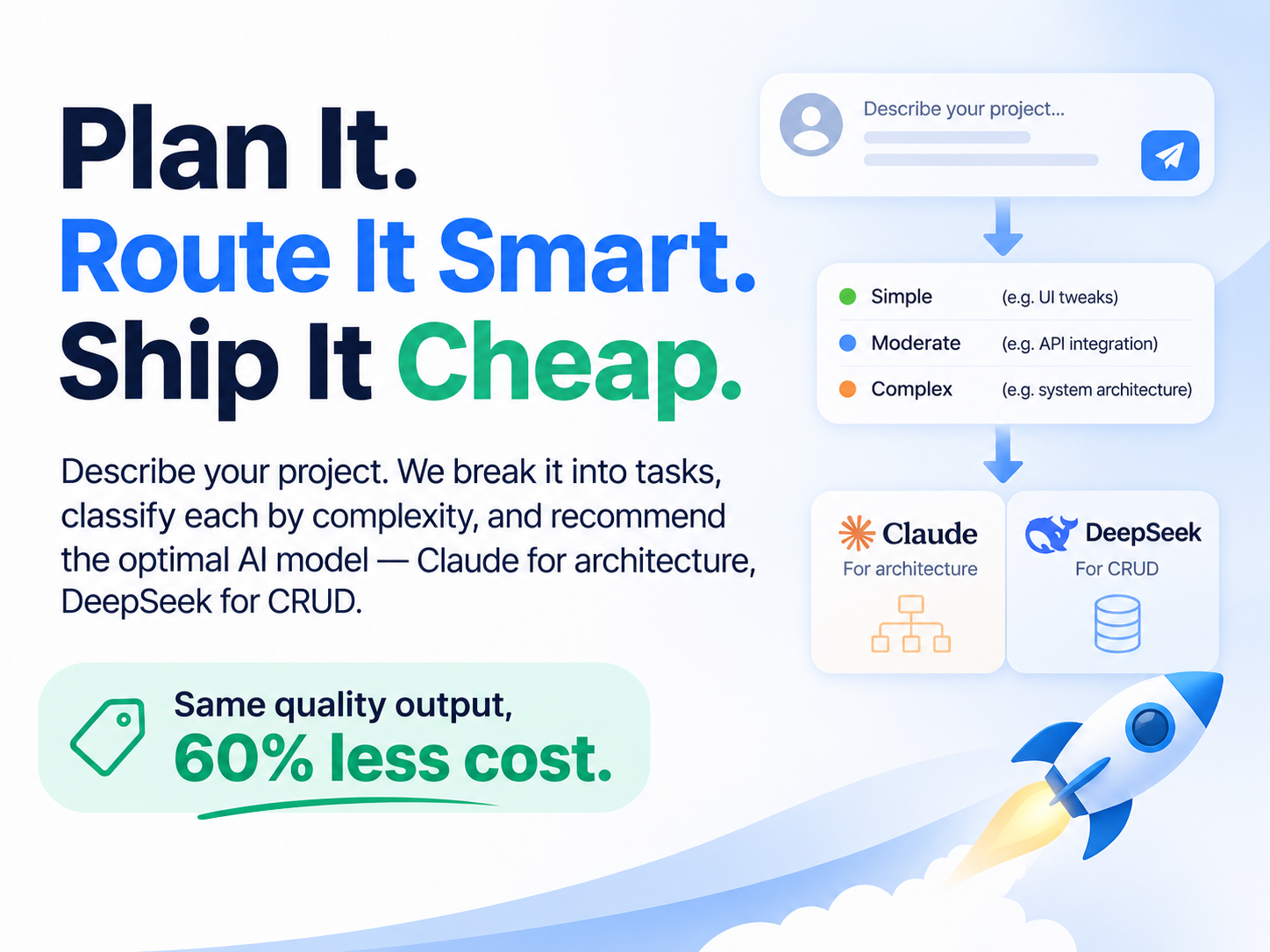
If you have spent a weekend feeding feature requests into Claude and then watched the monthly bill climb, the pitch behind VibeCoderPlanner will land immediately. The product says it plainly: AI models are expensive, so use the right one for each task. Instead of pointing one premium model at everything, it splits your idea into tasks, grades each task by complexity, and routes the work to whichever AI model gives the best value for that specific job.
That is a narrower promise than most AI coding tools make, and it is the reason this VibeCoderPlanner review is worth writing. Almost every competitor sells more autonomy. This one sells a smaller bill for roughly the same output, plus a plan you can read before an agent starts writing files into your repository.
One thing to get out of the way first: I signed up for the free account and generated a real plan, which is where the screenshot in this review comes from. I did not buy Pro or let an agent open pull requests against a repository, so on the question of code quality this is a reading of how the workflow is designed rather than a benchmark. Where I repeat a vendor number, I say so.
The Vibe Coding Problem Nobody Budgets For
Vibe coding works brilliantly for the first hour. You describe a feature, the model writes it, you test it, you move on. Around the second day, three things tend to go wrong at once.
The first is context. Dumping an entire product idea into one chat thread bloats the window until the model starts forgetting decisions it made twenty messages ago. The site puts this bluntly: context overload means the model loses direction fast. Anyone who has seen an agent rewrite the same authentication flow three times in one session knows exactly what that looks like.
The second is structure. Without a roadmap, an agent loops. It reopens finished work, drifts into unrelated refactors, and treats "also add a dashboard" as part of the login task. The result is not bad code as much as code that nobody can sequence.
The third is cost, and this is where the marketing copy gets specific. Running every small CRUD endpoint through a frontier model is like hiring an architect to hang drywall. The bill arrives long before the value does, and most tools give you no per-task visibility into what you just spent.
VibeCoderPlanner is built around the claim that all three problems share one root cause: no plan, and no cost-aware routing on top of it.
What Is VibeCoderPlanner?
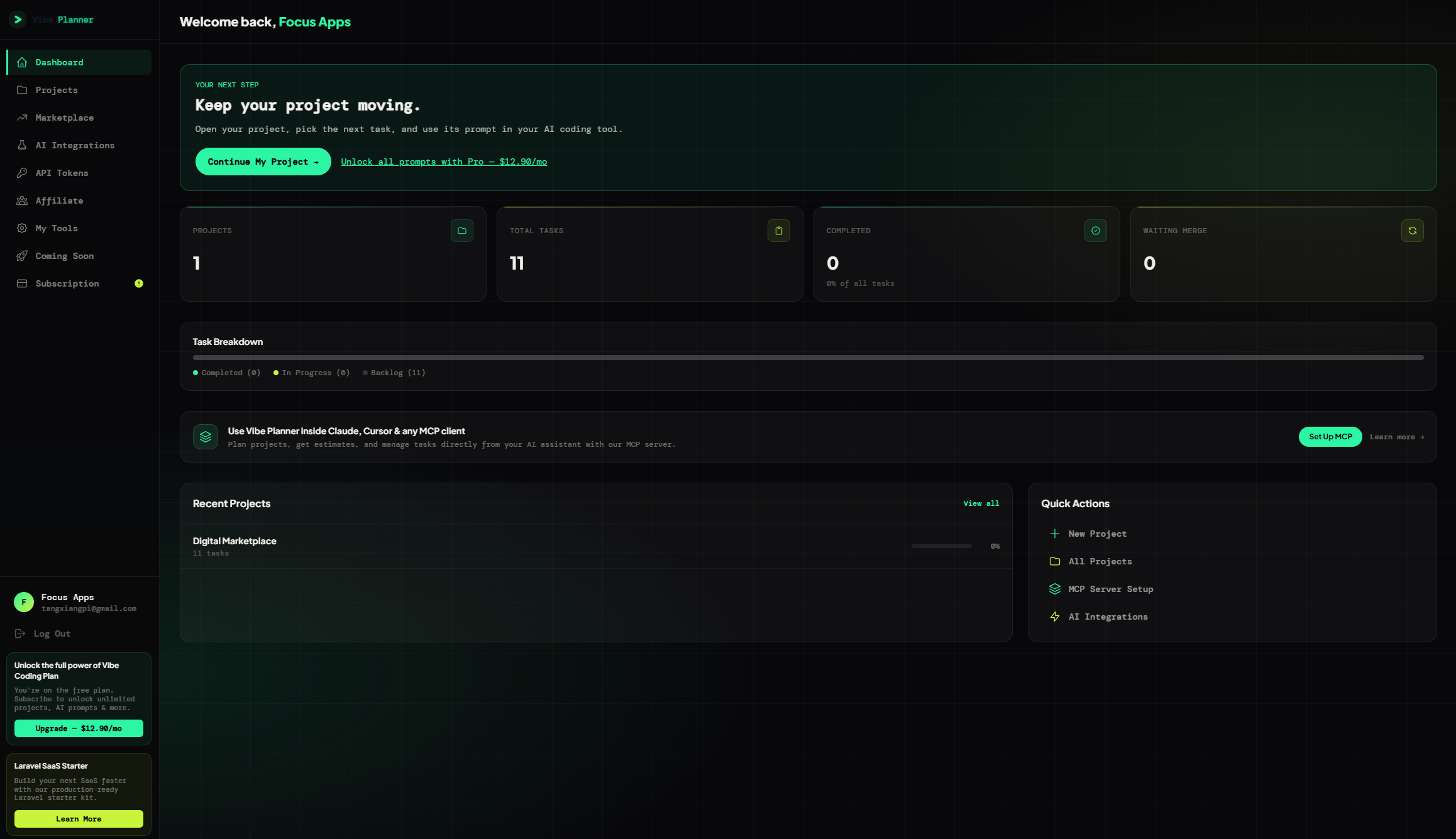
VibeCoderPlanner is an AI project planning and task execution platform for people who build software with AI agents. You describe an idea in plain language, it returns an ordered plan with tasks, complexity ratings, recommended AI models, estimated cost per task, and a prompt written for the model it assigned.
A note on naming, because the branding is a little loose. The domain is vibecoderplanner.com, the footer says Vibe Coding Plan, and the interface often calls itself Vibe Planner. They are all the same product, built by Martin Tonev and running on Laravel 12. The site claims 1,856 active builders and more than 5,000 plans generated so far, which puts it in early-stage, maker-run territory rather than venture-funded platform territory. That shapes what you should expect from the docs and the support queue.
What separates it from a generic AI chat wrapper is the routing layer. Every task in a plan carries a complexity grade and a model recommendation, and that recommendation is driven by cost rather than brand loyalty. Claude and GPT-4 class models get architecture, security, and complex logic. Copilot and Gemini get feature implementation and integrations. DeepSeek and Kimi get CRUD, tests, boilerplate, and configuration.
Then the plan becomes executable. Tasks sit on a kanban board (Backlog, In Progress, Completed), agents run them with the assigned model, and on completion the platform opens a pull request against your GitHub repository.
Smart Model Routing: How the Cost Decision Works
Every other feature in VibeCoderPlanner hangs off smart model routing, so start there. The routing table on the site is unusually specific:
| Task type | Assigned models |
|---|---|
| Architecture, security, complex logic | Claude, GPT-4 |
| Feature implementation, integrations | Copilot, Gemini |
| CRUD, tests, boilerplate, configs | DeepSeek, Kimi |
Seven or more models are supported. The company's own writing names six providers (Anthropic Claude, OpenAI Codex, Google Gemini, GitHub Copilot, DeepSeek and Kimi), and the bundled GLM 5.3 makes seven. You can override the recommendation per task if you disagree with it. The platform is BYOK at heart: you connect the provider with your own key and pay that provider directly. The one exception is a model bundled into the Pro subscription, which I will come back to.
The sample plan that explains the whole product
The site includes a worked example with per-task price estimates, and it is the clearest illustration of the value proposition:
| Task | Complexity | Model | Est. cost |
|---|---|---|---|
| Design database schema and relations | High | Claude | $0.42 |
| Set up authentication and JWT | High | Claude | $0.38 |
| Create CRUD API endpoints | Low | DeepSeek | $0.03 |
| Add input validation middleware | Medium | Copilot | $0.12 |
| Write unit tests for auth | Low | Kimi | $0.02 |
| Build dashboard UI components | Medium | Copilot | $0.14 |
| Set up CI/CD pipeline | Low | DeepSeek | $0.04 |
| Implement rate limiting | Low | DeepSeek | $0.03 |
The two architecture tasks cost more than all six implementation tasks combined, which is the argument for routing in one table. The numbers are the vendor's own estimates and your mileage will move with context size, but anyone who has audited an AI bill will recognize the shape.
From Idea to Pull Request: The Whole Loop
Routing only matters if the plan around it holds up. Here is the loop the product describes, in four steps.
Step 1, describe your idea. No specification document, no wireframes, no architecture diagram. You type what you want to build, optionally add a feature list, and the platform generates a plan. The site offers example prompts if you want to see the output shape before signing up.
Step 2, the plan arrives with model assignments. Your idea turns into ordered tasks across phases (scaffold and routing, auth, payments, dashboard, and so on), each with a High, Medium, or Low complexity grade, a recommended model, and an estimated cost. You can see the spend before you commit to running anything, which is the part most AI tools skip.
Step 3, execute each task with the assigned model. Complex work goes to Claude, boilerplate goes to DeepSeek, tests go to Kimi. Execution shows terminal output in real time, reads your existing codebase, writes files, and opens a pull request when the task is done.
Step 4, ship. You review the diff, approve, merge, and optionally let Vercel deploy hooks fire after tasks complete. The whole loop is meant to keep you at the review gate rather than in the prompt-writing seat.
The demo walkthrough: see the workflow without signing up
There is also a demo page at vibecoderplanner.com/demo, and it is the fastest way to decide whether the workflow suits you. It is a clickable walkthrough of the real interface loaded with sample plans, so nothing is generated live and nothing is saved.
What you can do there without an account: click any kanban card to open the AI coding prompt attached to that task, move a card to In Progress to see how execution is triggered (on the demo it is a sample plan, not a live run), hit Copy Prompt and paste the result straight into Cursor, Claude, or Copilot, then use Rebuild Board or Try Another Idea to load a different sample project.
Read the "Before you start" FAQ on that page, because it answers the questions the landing page leaves open. The demo is explicitly a walkthrough with sample plans, not a live AI run. You get one real AI-generated plan after signup. Planning and the free prompts work without connecting GitHub or an API key. You can also keep working in Cursor or VS Code by copying prompts instead of enabling auto-execution, which means the product is useful even if you never let an agent touch your repository.
One small inconsistency worth knowing: the demo section is labelled "Live workspace" while the FAQ on the same page says it runs on sample plans. It is a walkthrough, so nothing breaks. It just tells you the site's labels are more confident than its footnotes, which becomes a theme once you get to the pricing.
The first project: what the makers' own guide says
The company blog has a walkthrough for the first real project, and it is more candid than the landing page. The condensed version, since it tells you what actually goes wrong:
Describe a small first version, and say what you are leaving out. The example prompt asks for a client portal on Laravel and Vue with sign-in, support requests, and an admin view, then explicitly defers billing, live chat, and file uploads to a later release. If you already have code, state what exists so the plan builds on it instead of replacing it.
Read the plan before executing anything. Check that the scope matches your intent, that no unrequested features appeared, and that dependencies are ordered correctly. The article's own example of a good constraint: each client sees only their own requests, administrators see all of them, and access control must also apply when someone opens a request by direct URL.
Start with the earliest task whose dependencies are ready. Not the dashboard, not the admin panel. Read the task prompt first and confirm the result will be verifiable, then move it to In Progress to trigger the agent. Finish that one task before starting the next.
Test against the original requirement, not the execution log. Build two test accounts, submit a request as client A, log in as client B, and paste A's request URL into the address bar. If B can open it, the task is not done. The blog is blunt about this: a generated screen or a successful execution log alone cannot tell you whether the requirement was met. Turn the failure into a reproducible fix task instead of a vague "fix permissions."
Treat Completed as approval of the code. Moving a card to Completed triggers the merge request, and the company's own guide notes that GitHub's required checks and reviews still apply. That is a human gate, not an autopilot.
That sequence is unglamorous, and it is also the most useful thing on the site. Most AI coding disasters are not model failures. They are people accepting a running demo as proof of completion.
Key Features Beyond the Routing Layer
AI project planning and complexity classification
The planning engine turns a paragraph of intent into a sequenced backlog. What makes it more useful than a generic task list is the classification: because every task is graded High, Medium, or Low, the plan doubles as a budget forecast. Vague ideas become ordered work with time estimates instead of a wall of prose.
What a real plan looks like on the free plan
I signed up and generated a plan for a marketplace idea: creators sell digital templates, buyers browse, search by category, and purchase downloadable files. The result was 11 tasks, and the board matched the marketing screenshots closely. The dashboard above it counted 1 project, 11 total tasks, 0 completed, 0 waiting to merge, which is the same three-column board the site advertises.
The first card, "Initialize Next.js Marketplace Foundation," was graded low and tagged GLM 5.3 by VibeCodedPlanner, with a "Free" label. "Design Marketplace Data Model" and "Implement Authentication and Creator Profiles" were both graded high and routed to Claude. Every card carried the same two controls, Move to In Progress and Move to Completed.
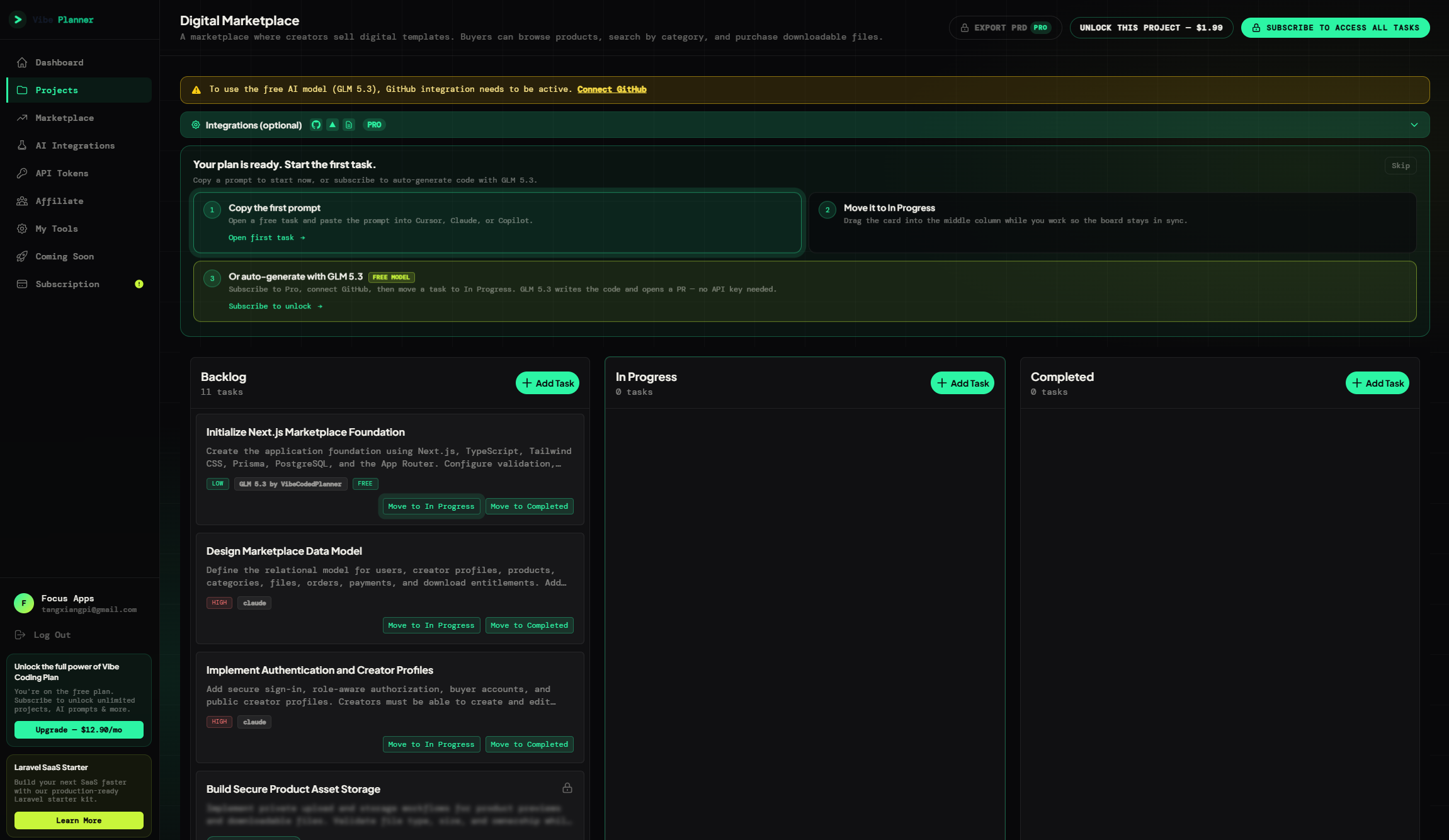
The rest of the plan was visible but sealed. From the fourth card onward, only the title and a "Click to unlock prompt" button appeared, with an "Unlock This Project" button priced at $1.99 and "Subscribe to Access All Tasks" in the header. The onboarding panel offered the same three options: copy the first prompt into your editor, drag a card into the middle column, or subscribe and let GLM 5.3 write the code and open a PR.
Two details I did not expect. The first task bundled a whole stack decision into its scope (Next.js, TypeScript, Tailwind, Prisma, PostgreSQL, plus validation, linting and environment variables), and the page does not say whether that came from my prompt or from the planner's defaults. And a banner across the top of the board said the free GLM 5.3 model needs an active GitHub integration before it will run.
Cost estimation before execution
Each task carries an estimated spend, and the plan shows the total before you hit run. That single feature changes behavior. When you can see that a task costs $0.42, you start asking whether it needs to be a task at all.
AI task execution with per-task model selection
Execution is where the routing pays off. The platform sends each task to its assigned model with a prompt tuned for that model's strengths and context limits instead of one generic mega-prompt for everything. Tasks stay scoped small enough to fit a context window, which addresses the "context window exceeded" failure mode directly.
What is actually inside a task prompt
The prompt format is where a lot of the discipline lives. Each task prompt follows a fixed structure instead of a sentence you typed once: the role, the objective, existing project context, requirements, technical constraints, the files that may be changed, the files that must not be changed, acceptance criteria, the tests that have to pass, and the expected output.
The exclusions are the underrated piece. Prompts like "do not modify the authentication flow," "do not rename existing columns," and "do not refactor unrelated controllers" are what stop an agent from improving your codebase into a merge conflict. The company's own writing makes the case better than I can: a structured task lets the model focus on one problem deeply instead of touching twenty problems superficially. The related advice is that one task should produce one coherent change you can commit on its own branch.
Each card also carries complexity, recommended model, estimated cost, its position in the dependency order, kanban state, and the project context it inherits. That metadata is why the board is more than a to-do list.
Caveman: output compression as a second cost lever
Routing decides which model you pay. A second lever decides how many words you pay for, and this is the least discussed idea in the product.
A blog post from April 2026 argues that verbose AI answers are a structural inefficiency rather than a minor annoyance: politeness, filler, and re-explanations of things you already know get multiplied across 50 tasks per feature and 200 per sprint. Their experiment is called Caveman, and it strips output down to facts, fixes, code, and actions. Asked to fix an expired JWT that keeps a user logged in, a normal assistant opens with "Sure, I'd be happy to help" and a paragraph on how JWT works. Caveman answers with the bug, the fix, and the response code.
The limits are stated plainly, which is unusual for this kind of post: Caveman does not improve reasoning, does not change model intelligence, and does not reduce thinking tokens. It only compresses what comes back. Their example is 1,000 output tokens down to 400, which over 100 tasks saves 60,000 tokens. No methodology is published for the 60 percent figure, so treat it as a direction rather than a measurement. It also means less explanation of edge cases, so read compressed diffs instead of skimming them.
The bundled model on Pro
GLM 5.3, branded by VibeCodedPlanner, is included on Pro and Enterprise, and it removes the bring-your-own-key step entirely: you do not create an external API key to use it. It is an execution option, not a planning requirement, and the other providers stay available if you prefer your own credentials or your own rate limits. The pricing page also lists "AI skills optimized to save you tokens," which is the practical version of the Caveman idea above.
The in-app notice adds a condition the marketing pages leave out: to use the free GLM 5.3 model, the GitHub integration has to be active first. So the model that was supposed to remove setup still asks for one setup step, and it wants repository access before it runs anything.
What the announcement does not tell you is how much of the model you get. Nothing public states a call quota, rate limit, context window, or data retention policy, and "unlimited everything" in the feature list is a marketing line rather than a documented term. A post from September 2026 also mentions a free open-source model for simple tasks as coming soon, but it does not appear on the pricing page, so treat it as roadmap rather than feature.
Kanban board
Backlog, In Progress, Completed. Drag and drop between columns. This sounds mundane until you have tried to manage a dozen parallel AI tasks in a chat log. A board gives agentic development the project management layer it normally lacks.
GitHub automation
Connect a repository and the platform handles branch creation, commits, and pull request creation, then triggers the merge when you move the task to Completed. GitHub's required checks and reviews still apply, so the gate stays human. That is the point: the automation removes the git chores, not the judgment.
Context memory
Project knowledge persists between sessions, so an agent picking up the fifth task knows how the first four were built. This is the difference between a plan that holds together and a plan where each task reinvents the auth middleware.
PRD export
Plans export as a Markdown product requirements document. For freelancers and agencies this is one of the more practical features: the same artifact that drives your AI tasks is also the document you send a client for sign-off, so the scope conversation and the build instructions stop being two separate jobs. On the free plan the Export PRD button carries a Pro badge, so treat export as a paid feature even though the plan itself is free to read on screen.
VS Code and Cursor extension, REST API, MCP server
You can manage tasks from inside the editor rather than tabbing to a web app, call the REST API from your own tooling, or plug the MCP server into an agent client. None of this is essential on day one, but it is the difference between a tool you use and a tool you build around.
50+ tech stacks
Plans are generated with your stack in mind: Laravel, React, Vue, Next.js, Python, and dozens more. The generated tasks reference actual framework conventions rather than generic pseudocode, which is why the output reads like a plan for your project instead of a plan for a project.
Vercel deploy hooks
When a batch of tasks completes, a deploy hook can fire automatically. Small feature, but it closes the last manual gap in the loop.
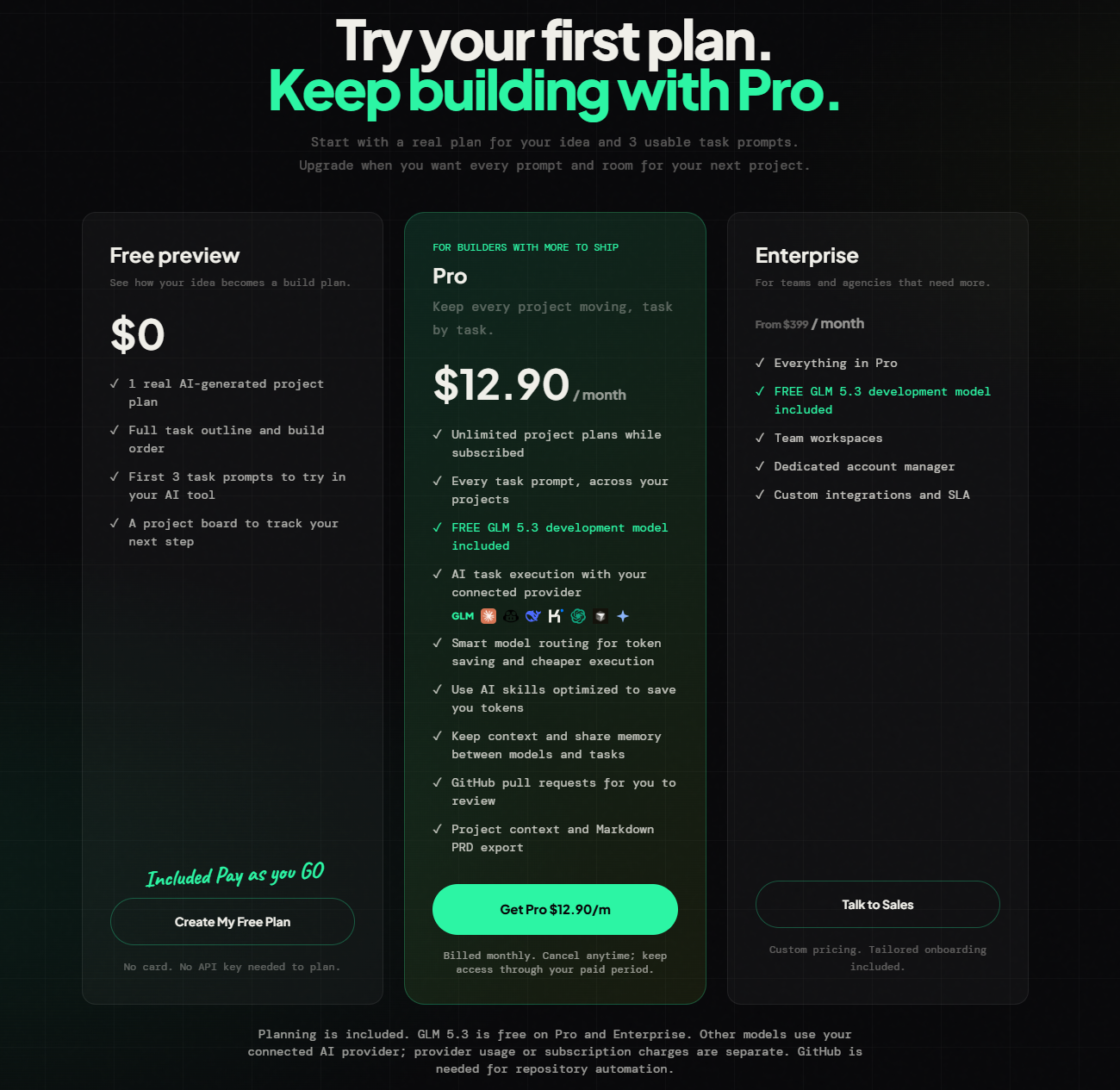
Pricing: Free Preview, $1.99 Project Unlock, $12.90 Pro, Enterprise From $399
Four tiers, no asterisks. What the page lists, with the numbers taken from it rather than from older blog posts:
- Free Preview ($0): one real AI-generated project plan, the full task outline and build order, the first 3 task prompts to try in your own AI tool, and a project board to track the next step. No card and no API key needed to plan.
- One-time project unlock ($1.99): purchased from the project page, it unlocks one project. No subscription attached, which suits people finishing a single build.
- Pro ($12.90 per month): unlimited project plans while subscribed, every task prompt across your projects, the included GLM 5.3 development model, task execution through your connected provider, smart model routing, the token-saving AI skills, shared context across models and tasks, GitHub pull requests to review, and Markdown PRD export. Billed monthly, cancel anytime, and access continues through the paid period.
- Enterprise (from $399 per month): everything in Pro plus team workspaces, a dedicated account manager, custom integrations, and an SLA, with custom pricing and tailored onboarding.
The free preview is more usable than the landing page suggests. You get a complete plan with every task, model recommendation, and cost estimate, plus three prompts you can paste into Cursor or Claude. The board I generated listed all 11 tasks with their complexity and model tags, and the prompts from the fourth card on sat behind a "Click to unlock prompt" lock. That is enough to judge whether the planning is any good before you pay, which is the right question to ask first. What you do not get is execution, so the paywall sits exactly where the vendor's confidence has to start.
Pro is the tier that makes the economics work, because the bundled model is what turns $12.90 into an all-in figure. Use your own keys and you are still paying Anthropic or DeepSeek separately, on top of the subscription. The site says this plainly: provider usage or subscription charges are separate, and GitHub is required for repository automation. If routing saves even the $150 per month the company claims, the subscription is a rounding error next to the API bill, but the API bill is still yours.
Enterprise at $399 and up is a different conversation for a different buyer: team workspaces, an account manager, an SLA. It is not aimed at a solo builder.
There is also a separate Laravel SaaS Starter sold alongside the planner, starting at $89 one-time, aimed at people who would rather skip rebuilding auth, Stripe, and an admin dashboard. It is a cross-sell, not part of the planner, but it explains who the product is really built for.
Plan the work before an agent writes a line of it. VibeCoderPlanner breaks your idea into tasks, grades each one, and routes it to the cheapest model that can actually handle it, then opens the pull request for you to review.
👉 Start with the free project at VibeCoderPlanner. No credit card needed, and Pro is $12.90/mo if you decide to keep going.
The Cost Math Behind $347 vs $127
The site publishes a monthly comparison that is easy to dismiss as marketing and worth examining anyway.
Running everything through Claude: about $347 per month. Running the same workload with smart routing: about $127 per month. The gap is $220, or roughly 63 percent, and the page claims the Pro plan pays for itself 15 times over at that difference.
Two things are true at once here. The comparison is hypothetical, based on the vendor's own task mix, and nobody outside the company has audited it. But the underlying mechanism does not depend on the exact number. Frontier models charge several times what budget models charge for the same token, and a large share of real development work (CRUD endpoints, config files, test scaffolding, migrations) does not benefit from frontier reasoning. If routing moves even a third of your volume to cheaper models, the direction of the saving is not in doubt, only the size.
The honest way to evaluate it is with your own numbers. Look at last month's AI spend, split it by task type, and ask how much of it was architecture versus boilerplate. That ratio tells you more than any comparison table, including this one.
VibeCoderPlanner vs a Chat-Only Workflow
| Aspect | Chat-only vibe coding | VibeCoderPlanner |
|---|---|---|
| Starting point | A blank thread and a vague idea | A generated plan with ordered tasks |
| Model choice | One model for everything, chosen by mood | Per-task routing by complexity and cost |
| Spend visibility | Surprise invoice at the end of the month | Estimated cost per task before execution |
| Context | Whole project dumped into one window | Tasks scoped to fit a context window, plus memory |
| Progress tracking | Scrollback archaeology | Kanban board with three states |
| Git work | Manual branches, commits, PR descriptions | Automated branch, commit, PR, merge |
| Team handoff | Screenshots and prose | Exported Markdown PRD |
| Reusability | Prompt craft locked in your head | Prompts generated per model, stored with the task |
| Prompt scope | Whatever you remember to include | Objective, constraints, excluded files, acceptance criteria |
| Output length | Verbose, explaining what you know | Compressed responses, fewer tokens per task |
The comparison is not entirely fair, because chat is free and a planner is not. But the real alternative is not "chat versus planner." It is "chat plus three wasted evenings plus a bill you did not model" versus a workflow where the plan exists before the code does.
Who Should Use VibeCoderPlanner?
Solo founders and indie hackers shipping fast
This is the core audience. If you are one person building a product with AI agents and paying for your own tokens, routing is the single highest-leverage cost decision available to you. The free project is enough to test whether the generated plan matches how you think about your build.
Freelancers and agencies
The PRD export is the standout here. You generate a structured plan, send it to a client for approval, and then execute against the same document. One agency founder quoted on the site notes that clients like seeing the structured plan before work starts, and that it reduced scope creep. Having the plan be machine-executable as well is the unusual part.
Full-stack developers using mixed stacks
Fifty-plus supported stacks means you are not forced into one ecosystem. Laravel, React, Vue, Next.js, and Python plans are all generated with framework-specific conventions instead of generic advice.
Technical leads onboarding new developers
Instead of a week of context sharing, a plan becomes the onboarding document. Tasks, sequencing, and architectural decisions are already written down, and context memory keeps the reasoning available to whoever picks up the work. A startup CTO quoted on the site puts it more bluntly: onboarding used to take weeks of context-sharing, and now a generated plan does most of that job.
Designers and students learning to build
The complexity grading makes a large project feel navigable. A designer turned developer or a computer science student building a final project gets a sequence of small steps instead of an intimidating monolith, and that is a real benefit when you are still learning what order things go in.
What VibeCoderPlanner Is Not
- Not an IDE. There is no editor, no debugger, no refactoring tool. It plans, routes, and opens pull requests. Your real editing still happens in VS Code, Cursor, or wherever you work.
- Not a fully autonomous engineer. Every task ends in a pull request that you review and merge. If you want code shipping without human review, this is not the tool.
- Not a model provider. On the free preview and the $1.99 unlock, execution runs through your own provider keys. Pro and Enterprise include GLM 5.3, but that is a convenience, not a replacement for the frontier models that handle architecture.
- Not a Jira replacement. The kanban board fits the AI workflow well, but it is not trying to run your company's sprint process.
- Not a response to "I have no idea what to build." It structures an idea you already have. It does not validate whether the idea is worth building.
Where It Falls Short
Five things bugged me, and two of them are about information rather than the software itself, which is usually where early tools are weakest.
The free preview stops right before the interesting part. You can judge the plan, which is the main event, but not the execution. The outline is complete, the prompts are not, and the cards themselves only show a title once you pass the free allowance. Whether the agent writes code you would accept is the question the $1.99 unlock or a Pro month exists to answer. A trial that let you run one task would be a better sales pitch, and it is not on offer.
The numbers are the vendor's, both times. The 60 percent claim, the $347 to $127 comparison and the "15x" payback are marketing math with no methodology page and no third-party benchmark. The per-task cost estimates work the same way: a task quoted at $0.03 can overrun if the agent needs three attempts, so read the plan total as a floor rather than a guarantee. Both are directionally sensible and neither is audited.
The subscription is not the whole bill. Unless you use the bundled model, execution is billed by your provider, separately from the $12.90. The pricing page is upfront about it, but it means the subscription alone does not tell you what a month of building costs.
It is still an early, Laravel-leaning product. 1,856 builders and 5,000 plus plans is a real product with real users, not a ghost ship, but it is nowhere near the ecosystem size of tools with public documentation and years of edge cases. The maker's other product is a Laravel starter and the examples lean Laravel, so that is the best-supported lane. On an unusual stack, generate a plan on the free preview and read it critically before subscribing.
The limits and the enterprise tier are undocumented. Pro includes GLM 5.3, but nothing states how many calls you get, what the context window is, or how your code is retained. Enterprise at $399 and up adds team workspaces, an account manager and an SLA, but seat counts, usage terms and what the SLA covers are not published either. For a solo builder this is irrelevant, and for a ten-person team it means a sales conversation.
VibeCoderPlanner FAQ
Is VibeCoderPlanner free?
Planning is. The Free Preview gives you one AI-generated plan with the full task outline and build order, the first 3 task prompts, and a project board, with no card and no API key. Automated coding and the remaining prompts need Pro at $12.90 per month or a $1.99 one-time unlock for that single project.
Do I need an API key or a GitHub repo to start?
No, not for planning. I generated an 11-task plan on the free account without connecting either. Both matter once you want execution: GitHub is required for repository automation, and the in-app banner says the free GLM 5.3 model needs an active GitHub integration before it runs. If you want Claude or DeepSeek to do the work, you supply that provider's key.
Can I keep working in Cursor, Claude, or VS Code?
Yes. Every task has a copy-ready prompt for your editor or chat tool, and the demo page's own copy says auto-execution is optional. There is a VS Code and Cursor extension plus an MCP connection if you would rather stay inside the editor, and a REST API for anything else.
Can I use my own models instead of the bundled one?
Yes, and the routing expects it. The platform is bring-your-own-key across Claude, OpenAI Codex, Gemini, Copilot, DeepSeek and Kimi, with per-task provider selection, and the pricing page notes that provider usage charges are separate from the subscription. GLM 5.3 is the exception that ships with Pro and Enterprise.
Does it merge code without me reviewing it?
No. A finished task opens a pull request, and moving the card to Completed triggers the merge request, but the company's own guide says GitHub's required checks and reviews still apply. Plan on reading every diff.
Final Verdict: VibeCoderPlanner Review Summary
VibeCoderPlanner is not trying to be the smartest AI coder. It is trying to be the accountant and the project manager sitting between you and your agents, and in 2026 that might be the more valuable seat.
Smart model routing is the differentiator. Most tools compete on model quality, which means everyone pays frontier prices for boilerplate. Sending schema design to Claude and CRUD endpoints to DeepSeek is obvious once you see it written down, and the point here is that it becomes the default instead of something you have to remember to do by hand.
The supporting pieces are coherent rather than decorative: complexity grading turns a plan into a budget, cost estimation makes spend visible before execution, the kanban board gives agentic work a state machine, and GitHub automation removes the branch and PR chores that make AI coding feel like admin. The structured task prompts, with their explicit list of files the agent must not touch, are a smarter design choice than they look. The PRD export is a nice bonus for anyone who bills clients.
And the thinking behind Caveman, their output compression experiment, is the part I would steal even if I never subscribed. Verbose answers are not free, and "explain less, do the fix" is a discipline most AI workflows lack.
The caveats are the caveats of an early product: a free preview that stops before execution, vendor numbers with no published methodology, provider costs sitting on top of the subscription, a small ecosystem with a Laravel bias, and quota details nobody has written down. None of those are dealbreakers at $12.90 a month, and none of them matter at all if you only want to finish one project, because $1.99 to unlock it is a fair price for finding out whether the agent is any good.
If you pay for AI coding out of your own pocket, the routing argument is worth testing this week. If your company already eats the token bill and you just want an agent that writes more code, the appeal is weaker.
Plan it, route it, ship it cheaper. VibeCoderPlanner breaks your idea into graded tasks, sends each one to the model that makes economic sense, and hands you a pull request to review.
👉 Click through the VibeCoderPlanner demo first, then create a free account to get your first AI-generated plan and three real task prompts. No credit card, Pro at $12.90/mo if it earns it.
Tags
# Review# VibeCoderPlanner# VibeCoderPlanner review# Vibe Planner# Vibe Coding Plan# VibeCoderPlanner demo# AI planning demo walkthrough# free AI project plan# kanban demo# smart model routing# AI project planning# AI coding cost# reduce AI API costs# token efficiency# AI token waste# Caveman output compression# verbose AI responses# structured task prompts# step by step AI development# one big prompt# AI pull request workflow# GLM 5.3# vibe coding# vibe coding workflow# AI task breakdown# task complexity classification# AI cost estimation# Claude vs DeepSeek# BYOK AI tools# bring your own key# multi provider AI# AI agent orchestration# kanban board for AI tasks# GitHub pull request automation# AI coding agent# PRD export# Markdown PRD# context memory for AI# VS Code extension# Cursor extension# MCP server# REST API for AI planning# 50 plus tech stacks# Laravel AI planning# Next.js AI planning# Vercel deploy hooks# indie hacker tools# solo founder tools# agency development tools# pay as you go AI# AI development model included# GLM model# structured AI development# context window management# AI coding workflow# developer productivity tools# AI planning tool for developers# ReviewFollow for new blogs
Subscribe to our blog
Subscribe to Newsletter
Subscribe to our newsletter to get the best products weekly.