
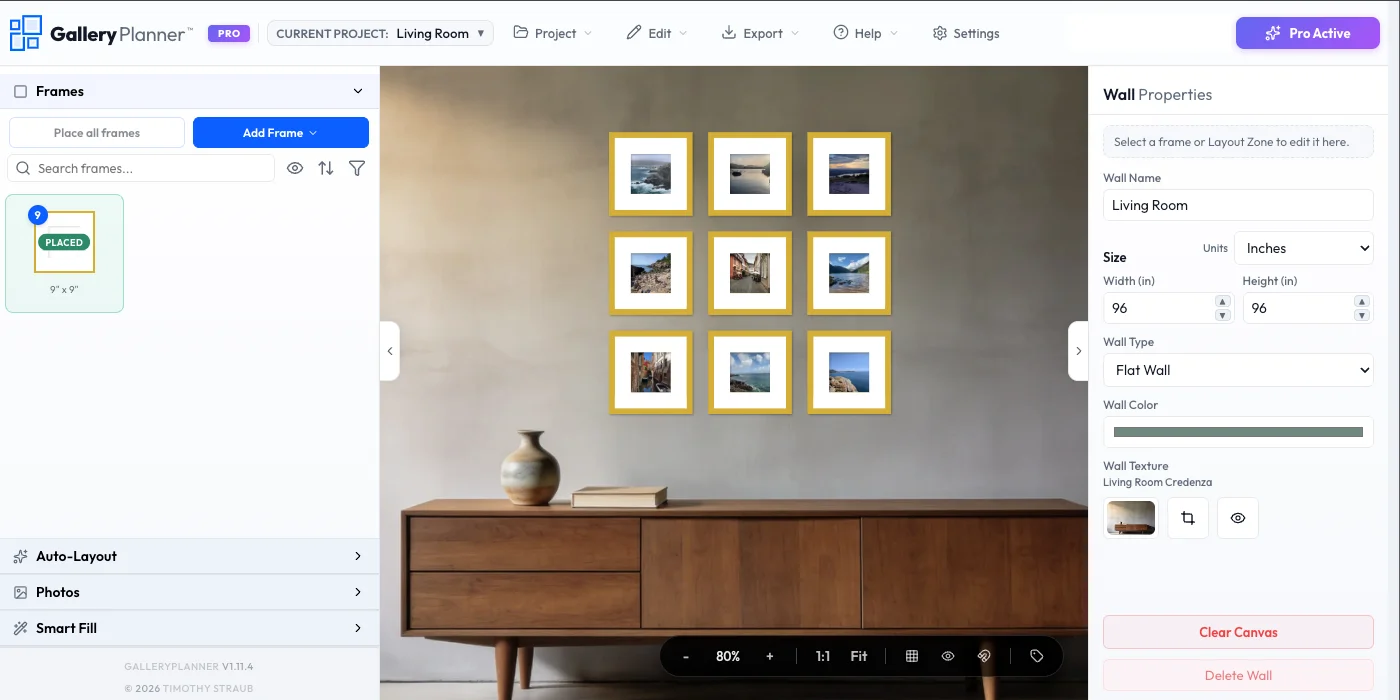
GalleryPlanner™ is an innovative, browser-based SaaS designed to revolutionize how users plan and execute gallery walls. It provides a digital scratchpad for arranging frames, testing spacing, and curating visual harmony, eliminating the need for physical trial and error.
This tool is perfect for homeowners, interior design enthusiasts, and anyone aiming to create a perfectly spaced and aesthetically pleasing gallery wall with minimal effort and maximum precision.
Key Features
Browser-Based & No Install: Plan directly in your web browser without downloading any software.
Auto-Layout Suggestions: Get intelligent recommendations for frame placement based on your inventory.
Real Inventory Planning: Use standard frame sizes or create custom dimensions for unique pieces.
Curate Visual Harmony: Place your actual photos within frames to plan not just the layout, but the art's visual impact.
Touch-Optimized Mobile Interface: Plan on the go with a native-like experience, including pinch-to-zoom and drag-to-arrange.
Drill-Ready Hanging Guides (Pro): Export precise, measurement-based PDFs for confident installation.
Use Cases
GalleryPlanner solves the common frustrations associated with hanging multiple frames. Instead of taping paper templates to walls or arranging frames on the floor, users can digitally experiment with countless layouts. The "Auto-Layout" feature is particularly useful for those feeling stuck, providing creative starting points based on their actual frame collection. This significantly reduces the time and effort involved in planning, making the process enjoyable and stress-free.
The platform also enhances the entire gallery wall creation workflow. Users can start a project on their mobile device while on the couch, save it, and then refine exact measurements on a desktop. Furthermore, the "Pocket Reference" capability allows users to instantly pull up their layout at a store to check if a new frame size fits their existing plan, ensuring informed purchasing decisions.
Pricing Information
GalleryPlanner operates on a freemium model. The core layout planning and design functionalities are available for free. Advanced features, such as hanging guide PDF exports, multi-project editing, project save/load, watermark-free snapshots, high-res photo exports, and shopping list exports, are unlocked with a Pro subscription. Pro Passes are available for short-term needs, or users can opt for Lifetime Pro. Current pricing is available at https://gallery-planner.com/pricing
User Experience and Support
The user interface is designed for intuitive interaction, especially on mobile devices, offering a touch-optimized experience with gestures like pinch-to-zoom and drag-to-arrange. GalleryPlanner provides extensive learning resources, including expert guides, design tips, video tutorials, and a comprehensive user guide, empowering users to master both the tool and the art of gallery wall design. The "Learn & Inspire" section offers valuable insights into choosing frame sizes and creating balanced compositions.
Technical Details
GalleryPlanner is a browser-based application that prioritizes user privacy through a "local-first" approach. This means that all user photos and data remain on their device and are processed within the browser, ensuring that sensitive image libraries are never uploaded to our servers. The platform is built with precision and leverages AI assistance to enhance its functionalities, such as layout suggestions.
Pros and Cons
Pros: Browser-based (no installation), free core features, strong privacy focus (local-first), AI-assisted auto-layout, supports real and custom frame sizes, mobile-friendly with seamless handoff, comprehensive learning resources, drill-ready hanging guide exports (Pro).
Cons: Advanced features (like PDF exports) require a Pro subscription
Conclusion
GalleryPlanner offers an intuitive, powerful, and privacy-conscious solution for designing perfect gallery walls. By providing tools to plan endlessly and drill once, it transforms a potentially daunting task into an enjoyable creative process. Explore GalleryPlanner today to effortlessly visualize and create your ideal gallery wall.
Comments
Achievement


Publisher

Launch Date2026-10-19
Platformweb
Pricingfreemium
Tech Stack
#TypeScript#Vite#React#JS
Sponsors

Boost Domain Rating
Raise your Ahrefs Domain Rating with 5 - 50 dofollow backlinks from DR 30–65 sites — from $50, guaranteed to improve your DR or your money back.

Nick Launches
A launch platform for builders —> Get discovered, get a backlink.
Become a Sponsor
Get your brand featured here
Outbid
View🥇 🥈
🥈 🥉
🥉
Want this spot? Pay what you wantBest Launch Directories: launch directories with DR, traffic and pricing
Launch directories, product launch platforms and startup listing sites in one table, with Domain Rating by Ahrefs, traffic where known, pricing and link type for each.
$50
Boost Your Domain Rating — DoFollow Backlinks (DR 30–70) from $30
Raise your Ahrefs Domain Rating with 5 - 50 dofollow backlinks from DR 30–60 sites — from $50, guaranteed to improve your DR or your money back.
$45
DirEasy - The Best Directory Boilerplate with AI | DirEasy
The best directory boilerplate, packed with AI, Listings, Payment, Submission, CMS, Blog, Authentication, Newsletter, SEO and more.
$41