This project is scheduled for launch
Launch date: Thursday, April 22, 2027 at 08:00 AM UTC
Scheduled
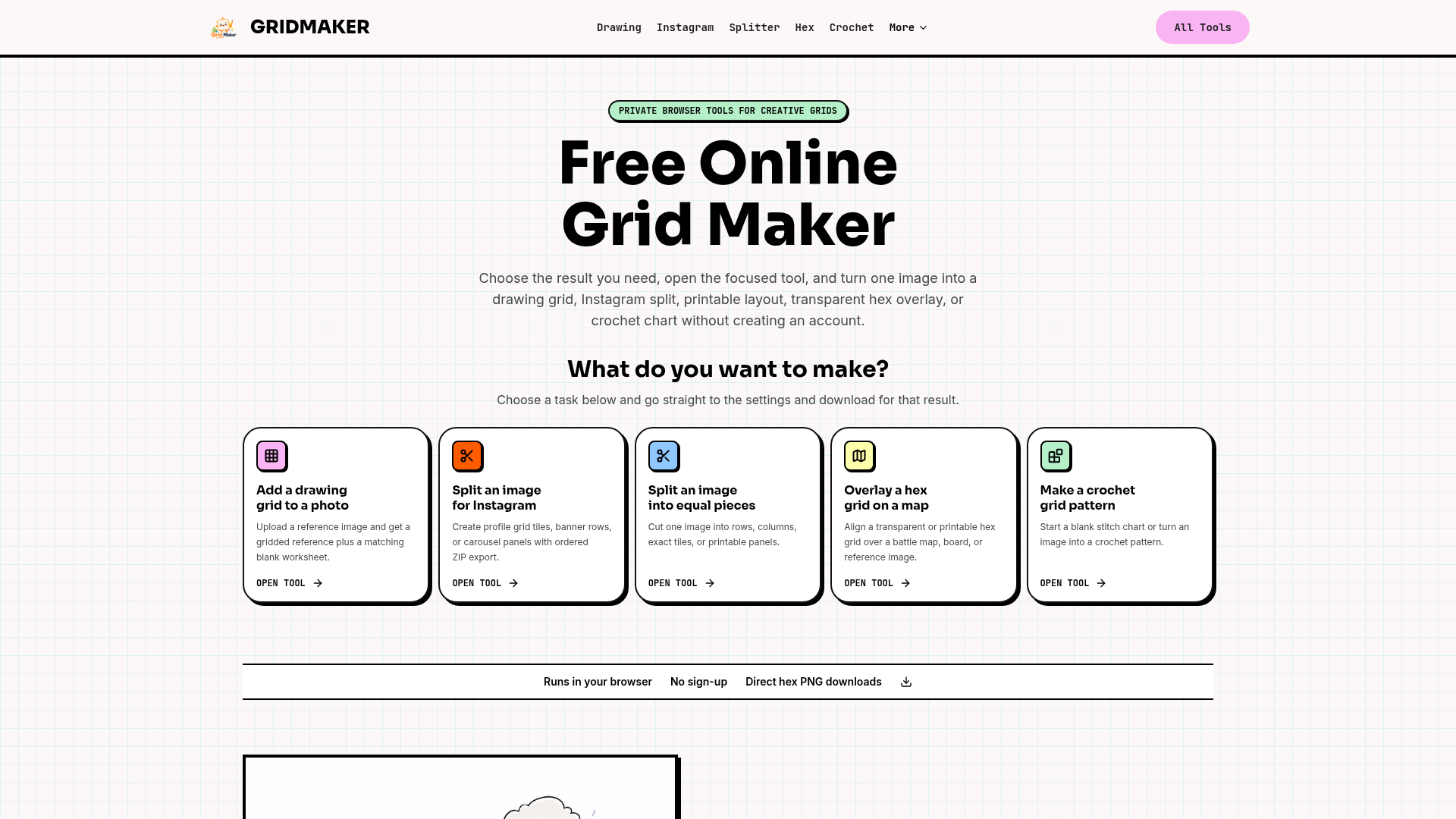
GRIDMAKER offers a comprehensive suite of free online tools designed to transform images into various grid formats for diverse creative and practical applications. It empowers users to effortlessly generate drawing grids, split images for social media, create transparent hex overlays for maps, and convert illustrations into crochet patterns, all without requiring an account or uploading files to a server.
GRIDMAKER caters to a wide audience including artists, students, teachers, social media creators, designers, crafters, and tabletop RPG players. Its intuitive, browser-based interface ensures privacy by processing all images locally on the user's device.
Key Features
- Drawing Grid Maker: Add adjustable grids to reference photos for art practice, complete with matching blank worksheets.
- Instagram Image Splitter: Create profile grid tiles, banner rows, or carousel panels with ordered ZIP exports for seamless social media posting.
- Image Splitter: Precisely cut images into equal rows, columns, exact tiles, or printable panels for various design and print workflows.
- Hex Grid Maker: Overlay transparent or printable hex grids onto maps, boards, or reference images, with customizable cell size and orientation.
- Crochet Grid Pattern Maker: Convert simple illustrations into stitch charts, complete with color legends and row-by-row planning information.
Use Cases
Artists and students can utilize the Drawing Grid Maker to accurately transfer proportions from reference photos to their canvases or paper, enhancing their drawing skills. Social media managers and content creators will find the Instagram Image Splitter invaluable for crafting visually appealing profile mosaics, multi-post banners, or engaging swipeable carousels, ensuring their content stands out. For designers and print professionals, the Image Splitter provides precise control over cutting images into specific dimensions for layouts or print production. Tabletop RPG enthusiasts and game designers can leverage the Hex Grid Maker to perfectly align transparent hex grids over battle maps or board designs, facilitating gameplay and design. Crafters can transform their favorite images into unique crochet patterns using the Crochet Grid Pattern Maker, making it easy to visualize and execute stitch-by-stitch designs.Pricing Information
GRIDMAKER is completely free to use. All its live grid tools run directly in your browser, eliminating the need for any sign-up, subscriptions, or hidden costs.User Experience and Support
The platform is designed for maximum ease of use, featuring separate, focused tools for each specific task. This approach keeps controls relevant to the desired outcome, minimizing clutter and simplifying the user journey. Images are processed locally within the browser, ensuring user privacy and fast performance. While direct support channels aren't explicitly mentioned, the intuitive design and clear instructions within each tool aim to provide a self-service experience.Technical Details
GRIDMAKER operates entirely client-side, utilizing modern web technologies to process images directly within the user's browser canvas. This architecture ensures that no images are uploaded to external servers, enhancing privacy and security. The tools are built to be lightweight and efficient, providing immediate results without server-side dependencies.Pros and Cons
- Pros: Free to use, no account required, strong emphasis on user privacy (local processing), diverse range of specialized grid tools, direct downloads (e.g., ZIP, PNG, PDF), user-friendly interface with focused controls.
- Cons: No explicit mention of advanced image editing features beyond grid application, optimal results depend on clear source images, no dedicated customer support channels mentioned.
Conclusion
GRIDMAKER stands out as an exceptionally versatile and privacy-focused online utility for anyone needing to apply grids or split images for creative, educational, or gaming purposes. Its commitment to being free and browser-based makes it an accessible and secure choice for a wide array of users. Explore GRIDMAKER today to streamline your creative workflows and enhance your projects with precision grids.Comments
Comments will be available once the project is launched.
Publisher

Launch Date2027-04-22
Platformweb
Pricingfree
Tech Stack
#web
Sponsors

Boost Domain Rating
Raise your Ahrefs Domain Rating with 5 - 50 dofollow backlinks from DR 30–65 sites — from $50, guaranteed to improve your DR or your money back.
Nick Launches
A launch platform for builders —> Get discovered, get a backlink.
Become a Sponsor
Get your brand featured here
Outbid
View🥇 🥈
🥈 🥉
🥉
Want this spot? Pay what you wantBest Launch Directories: launch directories with DR, traffic and pricing
Launch directories, product launch platforms and startup listing sites in one table, with Domain Rating by Ahrefs, traffic where known, pricing and link type for each.
$50
Boost Your Domain Rating — DoFollow Backlinks (DR 30–70) from $30
Raise your Ahrefs Domain Rating with 5 - 50 dofollow backlinks from DR 30–60 sites — from $50, guaranteed to improve your DR or your money back.
$45
DirEasy - The Best Directory Boilerplate with AI | DirEasy
The best directory boilerplate, packed with AI, Listings, Payment, Submission, CMS, Blog, Authentication, Newsletter, SEO and more.
$41