Introduction
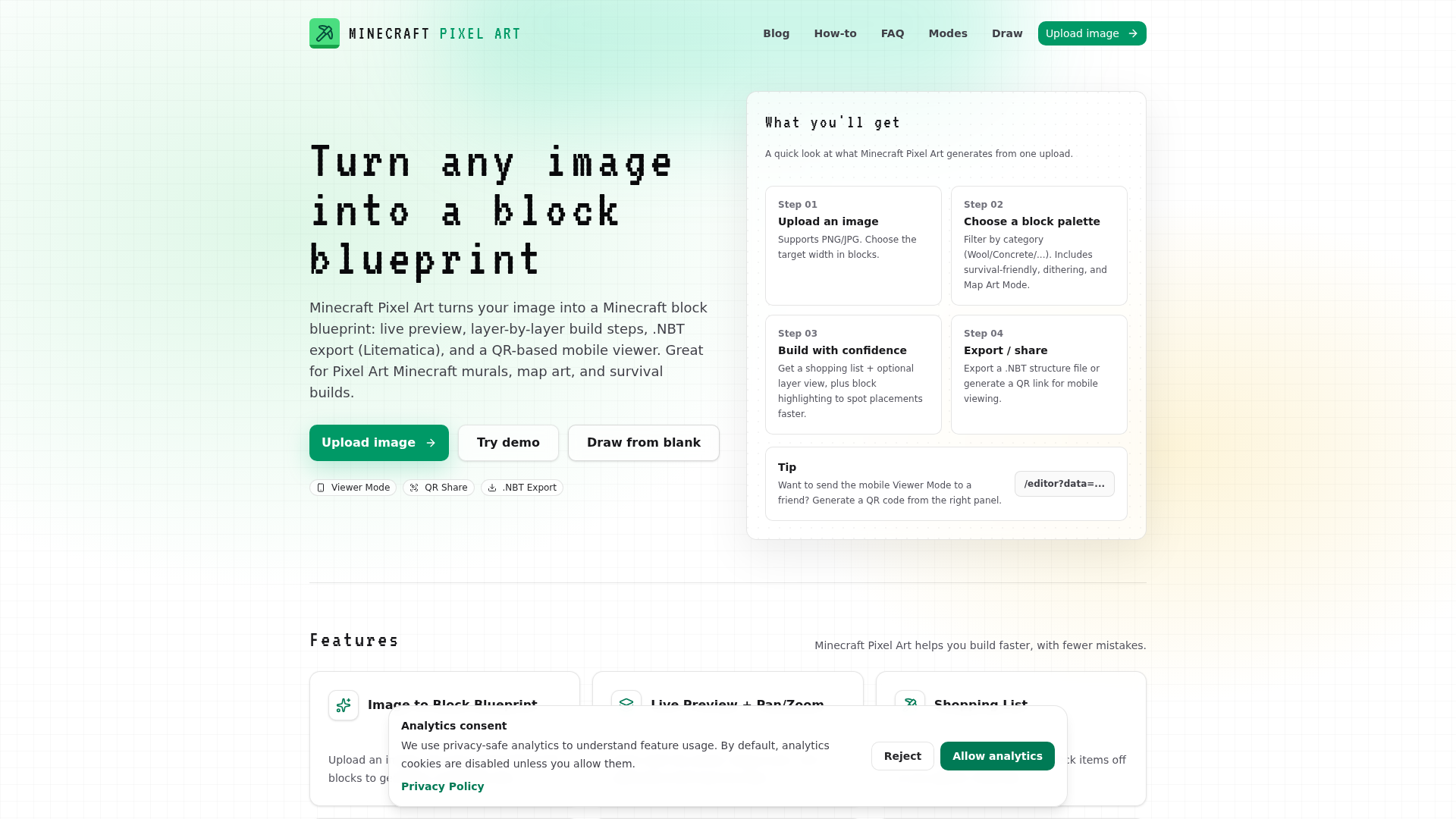
Minecraft Pixel Art is an innovative SaaS tool designed to transform any image into a detailed Minecraft block blueprint. It empowers creators to easily plan and execute pixel art murals, map art, and survival builds within the game, making complex projects accessible and manageable. This platform is ideal for Minecraft enthusiasts, builders, and content creators looking to bring their digital art into the blocky world with precision and efficiency.Key Features
- Image to Block Blueprint: Upload PNG/JPG images and automatically convert them into buildable Minecraft block plans.
- Live Preview + Pan/Zoom: Interact with your blueprint in real-time, with options to pan, zoom, and view layer-by-layer.
- Shopping List: Automatically generates a comprehensive list of required blocks, helping you gather materials efficiently.
- Layer-by-Layer Build Guide: Provides a step-by-step construction guide, ensuring organized and accurate block placement.
- .NBT Export (Litematica): Export structure files for seamless integration with in-game tools like Litematica, speeding up the building process.
- Mobile Viewer / QR Share: Generate shareable links and QR codes to view blueprints on mobile devices, facilitating hands-free building.
Use Cases
Minecraft Pixel Art is invaluable for anyone looking to create impressive structures in Minecraft. For instance, a player wanting to replicate a favorite character or logo as a large-scale mural on their survival server can simply upload the image, choose a block palette, and receive a detailed, layer-by-layer guide. This eliminates the guesswork and tedious manual counting of blocks, significantly reducing build time and errors. Another common scenario is creating intricate map art. The dedicated Map Art Mode ensures that the generated blueprint targets map colors, making it perfect for in-map pixel art projects. Whether you're a solo builder or collaborating with friends, the tool streamlines the entire process from conceptualization to in-game execution, allowing for more ambitious and polished creations.Pricing Information
While specific pricing tiers are not explicitly detailed, Minecraft Pixel Art offers a "Try demo" and "Open demo blueprint" option, suggesting a freemium model where users can explore core functionalities before committing to a potential paid version or advanced features.User Experience and Support
The platform emphasizes ease of use with a straightforward workflow: upload, choose palette, generate, and build. The live preview, pan/zoom, and layer view contribute to an intuitive user experience. Support is provided through a comprehensive FAQ section addressing common questions, including details on the shopping list, URL character limits, mobile viewer functionality, manual block editing, .NBT export, and Map Art Mode differences. An "Editor Guide" and "How-to" section further assist users in mastering the tool.Technical Details
The service operates as a web-based application, accessible through a browser. Blueprints are stored directly in the URL for sharing, indicating a client-side heavy architecture for data handling. While specific programming languages or frameworks are not mentioned, its functionality suggests modern web development practices for image processing, canvas rendering, and data serialization.Pros and Cons
- Pros:
- Automates complex pixel art conversion.
- Provides detailed layer-by-layer build guides.
- Integrates with in-game tools via .NBT export.
- Mobile viewer enhances building convenience.
- Supports manual block editing for fine-tuning.
- Survival-friendly and Map Art specific palettes.
- Cons:
- URL character limit for large projects may require workarounds (e.g., .NBT export).
- No explicit mention of cloud storage or project saving for very large builds.
- Requires basic understanding of Minecraft blocks and building.
Conclusion
Minecraft Pixel Art is an indispensable tool for any Minecraft builder looking to create stunning pixel art with precision and efficiency. By transforming images into actionable blueprints, it significantly simplifies the building process, from material gathering to final block placement. Explore the demo today and elevate your Minecraft creations to the next level.Comments
Publisher

Launch Date2026-08-31
Platformweb
Pricingfree
Tech Stack
#web
Sponsors

Boost Domain Rating
Raise your Ahrefs Domain Rating with 5 - 50 dofollow backlinks from DR 30–65 sites — from $50, guaranteed to improve your DR or your money back.
Nick Launches
A launch platform for builders —> Get discovered, get a backlink.
Become a Sponsor
Get your brand featured here
Outbid
View🥇 🥈
🥈 🥉
🥉
Want this spot? Pay what you wantBest Launch Directories: launch directories with DR, traffic and pricing
Launch directories, product launch platforms and startup listing sites in one table, with Domain Rating by Ahrefs, traffic where known, pricing and link type for each.
$50
Boost Your Domain Rating — DoFollow Backlinks (DR 30–70) from $30
Raise your Ahrefs Domain Rating with 5 - 50 dofollow backlinks from DR 30–60 sites — from $50, guaranteed to improve your DR or your money back.
$45
DirEasy - The Best Directory Boilerplate with AI | DirEasy
The best directory boilerplate, packed with AI, Listings, Payment, Submission, CMS, Blog, Authentication, Newsletter, SEO and more.
$41